 Maintivo

Invoice payment reminders, without the awkward phone call
Maintivo asks you, twice at most, whether each invoice has been paid. Tap Yes and it is marked paid. Tap No, send a reminder and your customer gets a short, polite email with the invoice and how to pay. Get paid faster, and nothing goes out unless you say so.


iPhone: No card. No account. First report free to fill in.In your browser: Free account, no card. First report free to fill in.
Has this been paid?
INV-1043 · Harbour Lettings · £480.00 · due 30 Nov
- Maintivo asks Has this been paid? about each sent, unpaid invoice, twice at most.
- Once before the due date, and once the day after: Still not paid?
- Yes marks it paid. No, send a reminder emails a short, polite reminder. Not now does nothing.
- Nothing is chased automatically: you decide who gets a reminder.
- Overdue from the day after the due date; a part-paid invoice is overdue for the balance.
- Deposits, Send balance and a Pay by card button help the money come in sooner.
- UK late-payment terms are printed on invoices to business customers.
How do invoice payment reminders work in Maintivo?
You send the invoice. Maintivo keeps an eye on the due date and asks you at the right moment. You answer in one tap.
Send the invoice
Maintivo emails it to your customer with your bank details, and a Pay by card button if card payments are on.
Maintivo asks you
Before the due date, and again the day after, you see Has this been paid? on the invoice, in the Invoices list and as a notification.
Answer in one tap
Yes marks it paid. No, send a reminder emails your customer. Not now does nothing, and the invoice stays as it is.
Who owes you, on the phone
Real screens from the iPhone app. Sample company and prices.
- 1
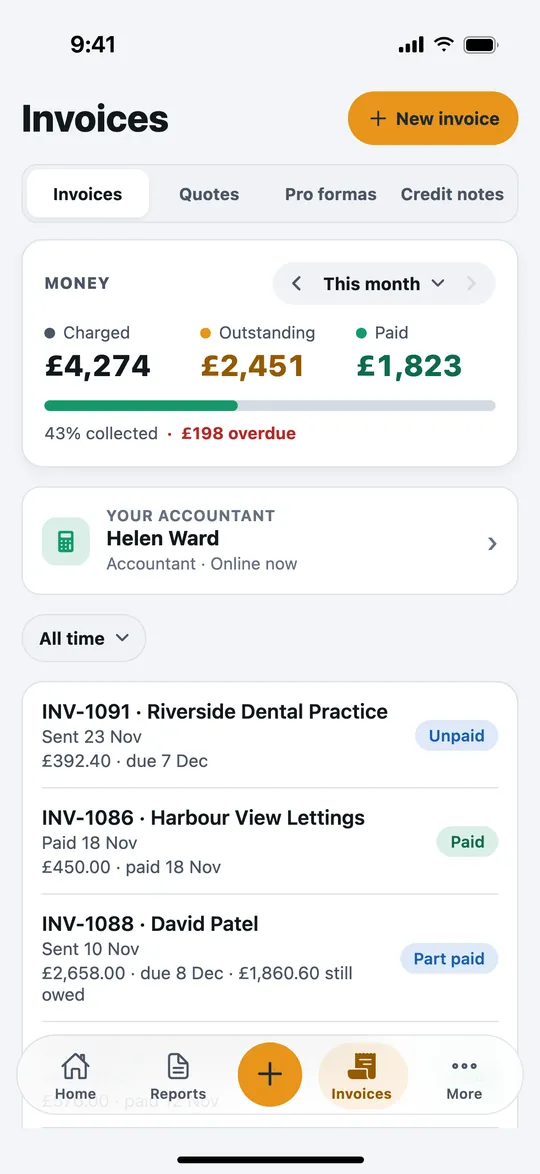
Every invoice and its status
Charged, outstanding and paid this month, with overdue invoices marked.
- 2
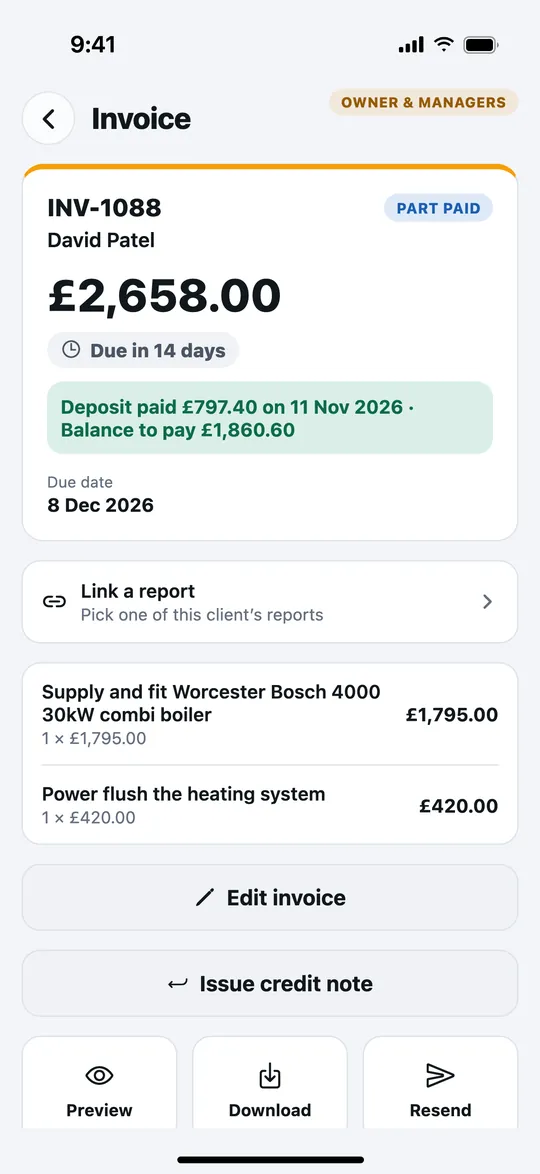
Part paid, balance to pay
The deposit paid, the balance still to come, and Send balance.
- 3
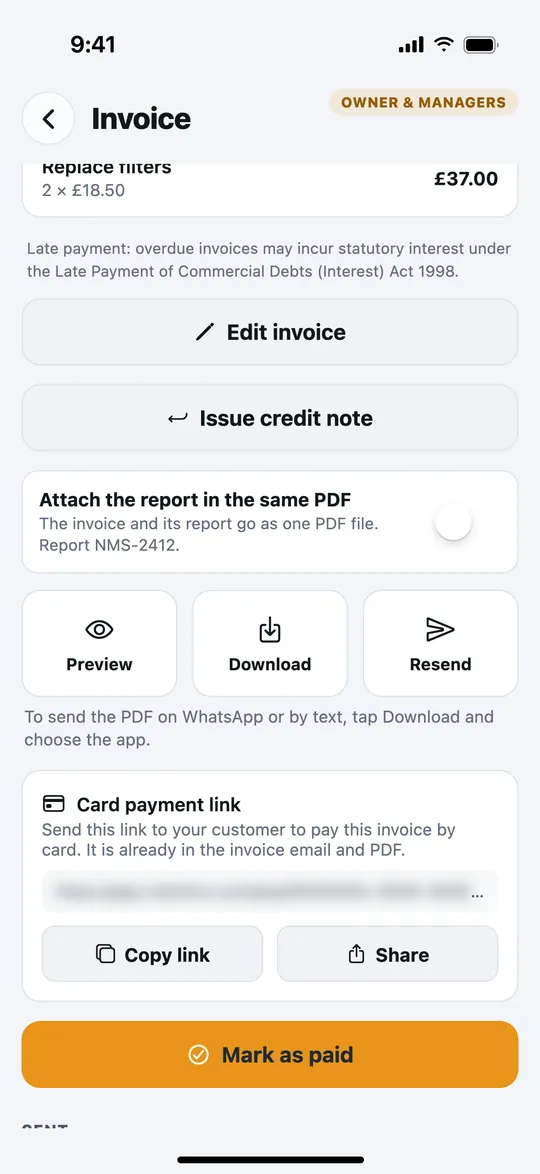
A card link on every invoice
Resend the invoice, or copy the Pay by card link.
When does Maintivo ask if an invoice has been paid?
Twice at most for each sent, unpaid invoice: once before it is due, and once the day after.
| When | What you see | In practice |
|---|---|---|
| Before the due date | Has this been paid? | A third of the time to pay before the due date, at least 1 day before. On 14-day terms, that is day 9. |
| 2 days or fewer to pay | Has this been paid? | On the due date itself. |
| The day after the due date | Still not paid? | Asked for invoices up to 14 days late. |
On the invoice and in the list
The question shows in the Invoices list, on the invoice page, and as a notification on your phone or in your browser.
The owner, or someone you trust
The owner answers, and so can anyone the owner gives the Invoices and quotes tick.
No nagging
Never on the day the invoice was sent, never more than twice, and never about a fully credited invoice.
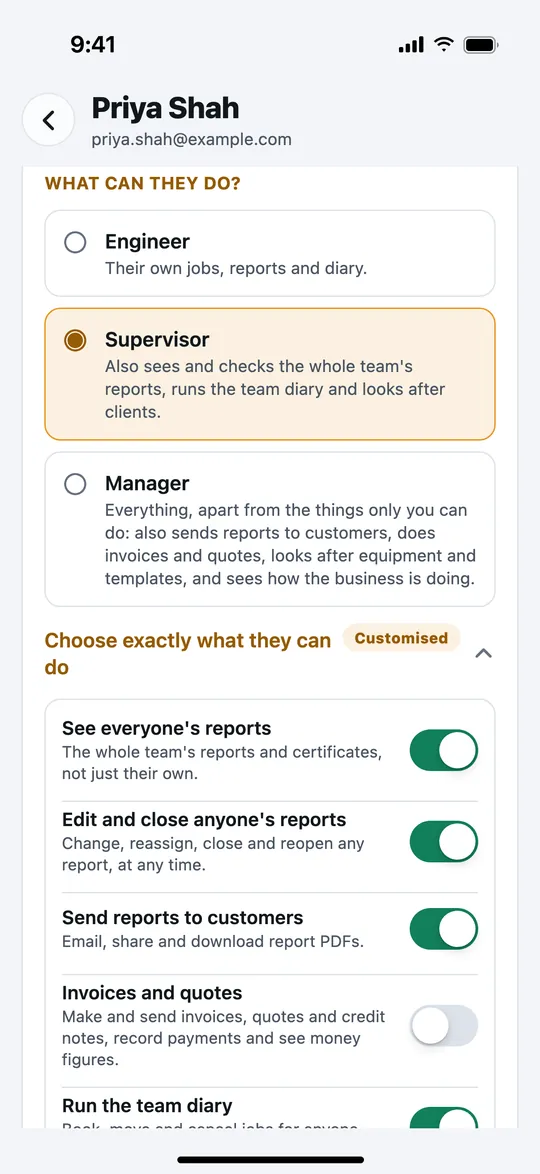
The owner, or someone you trust
- A level for each personEngineer, Supervisor or Manager, then change any tick.
- The Invoices and quotes tickLets someone make and send invoices, record payments and see money figures.
- Yours to changeTap a person on the Team screen to change it at any time.
What happens when I tap No, send a reminder?
Maintivo emails your customer a short, polite reminder with the invoice and how to pay. You do not write a word.
- ✓Short and politeA friendly nudge in one tap, so there is no awkward phone call.
- ✓The invoice againYour customer has the invoice in front of them, without digging through their inbox.
- ✓How to payEverything they need to pay you straight away.
- ✕No email, no reminderThe reminder needs the customer’s email address on the invoice.
You stay in control
Nothing is chased automatically. A reminder goes only when you tap No, send a reminder, so a good customer having a slow week never gets a nudge they do not need.
Maintivo does the remembering
It works out when to ask, keeps it to twice at most, and sends the polite email for you. No list of who owes what on the back of an envelope.
When is an invoice overdue?
From the day after its due date. The Invoices list shows the total waiting to be paid, so you know what is owed at a glance.
From the day after the due date
A sent invoice turns overdue the day after it was due. Drafts never do.
Overdue for the balance
When a deposit or part payment is in, the invoice is overdue for what is left, not the whole amount.
Treated as settled
A fully credited invoice is never overdue, never unpaid and never gets a reminder.
| Invoice | Customer | Where it stands | Owed |
|---|---|---|---|
| INV-1040 | Harbour Lettings | Paid | £0.00 |
| INV-1041 | Dale Court Management | Overdue | £1,250.00 |
| INV-1042 | Elm Road Café | Part paid, overdue for the balance | £300.00 |
| INV-1043 | Northgate Dental | Sent, not due yet | £620.00 |
The overdue amount also shows on the Money card on Home: see the owner dashboard.
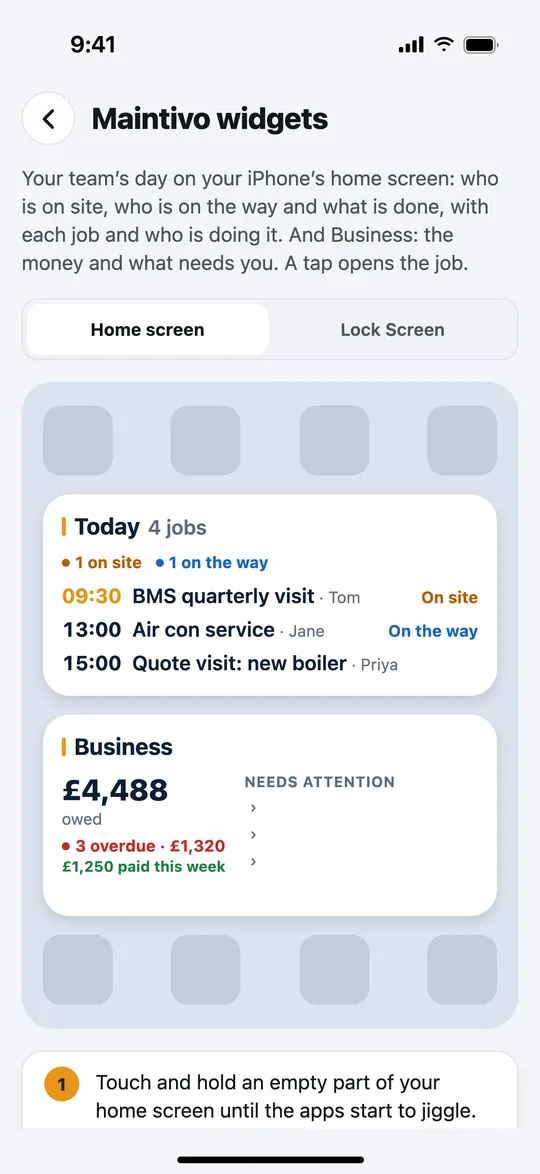
What is owed and overdue, without opening the app
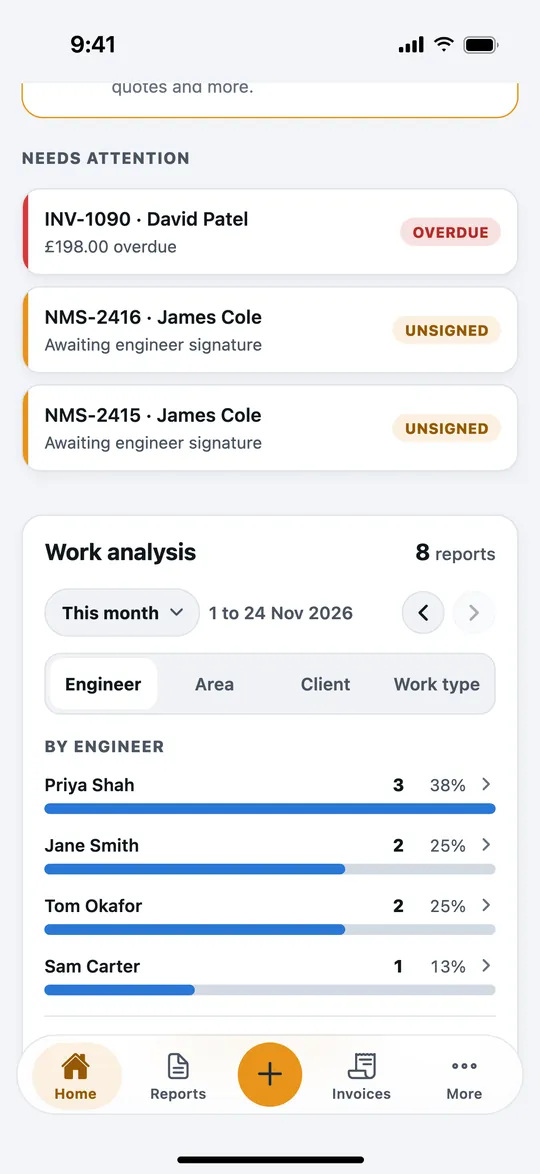
- OwedThe Business widget shows the money owed.
- OverdueHow many invoices are overdue, and how much.
- Paid this weekWhat came in this week, under the overdue figure.
How do deposits and card payments get me paid sooner?
Ask for a deposit before you start, and let customers pay by card in one press. Fewer invoices ever need a reminder.
Deposit to start
On an invoice with a deposit, choose whether the customer pays the deposit now or the full amount.
Deposit received
Record a deposit paid by bank transfer. The invoice shows Part paid until the rest comes in.
Send balance
One tap emails the customer: thank you for your deposit, the balance is now due.
Pay by card
With card payments on, invoices carry a Pay by card button, and paid in full by card turns the invoice Paid by itself.
Pay link
Copy or share the invoice’s pay link, for a customer who would rather pay from a text message.
Refunds made in Stripe
A refund is made in your Stripe account, not in Maintivo. It shows on the invoice, which goes back to unpaid or part paid.
How card payments work: card payments on invoices. Deposits start on the quote: quotes and invoicing in Maintivo.
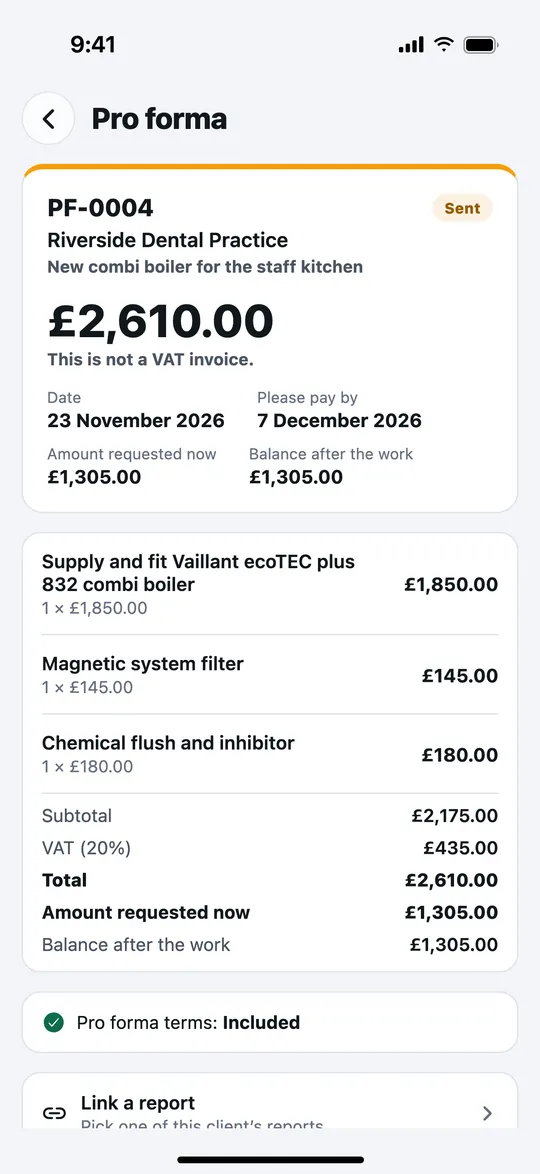
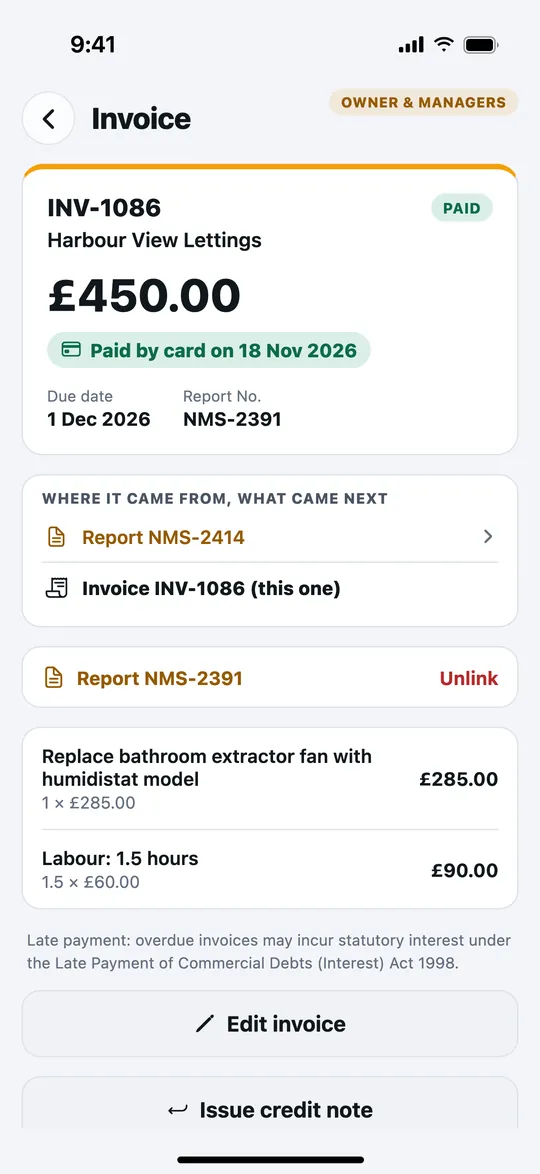
Ask for part now, and let them pay by card
- A pro forma firstThe amount requested now and the balance after the work, before you start.
- Paid by cardThe invoice shows Paid by card with the date, and turns Paid by itself.
- Where it came fromEach invoice keeps the report it was made from.
What late-payment terms can go on a UK invoice?
When a business customer pays late, UK law lets you claim statutory interest and a fixed sum for recovery costs. Maintivo prints these terms for you.
- ✓Statutory interest8% over the Bank of England base rate, on a late payment from a business customer.
- ✓Fixed recovery costs£40, £70 or £100, set by the size of the debt.
- ✓Business customersPrinted on invoices to business customers. Invoices to private customers leave them off.
- ✓Outside the UKIreland and the EU get their own version. Elsewhere, add your own late fee terms.
| What is owed | Fixed sum for recovery costs |
|---|---|
| Less than £1,000 | £40 |
| £1,000 to under £10,000 | £70 |
| £10,000 or more | £100 |
Source, checked 23 November 2026: legislation.gov.uk, Late Payment of Commercial Debts (Interest) Act 1998. This is a summary of the law, not legal advice.
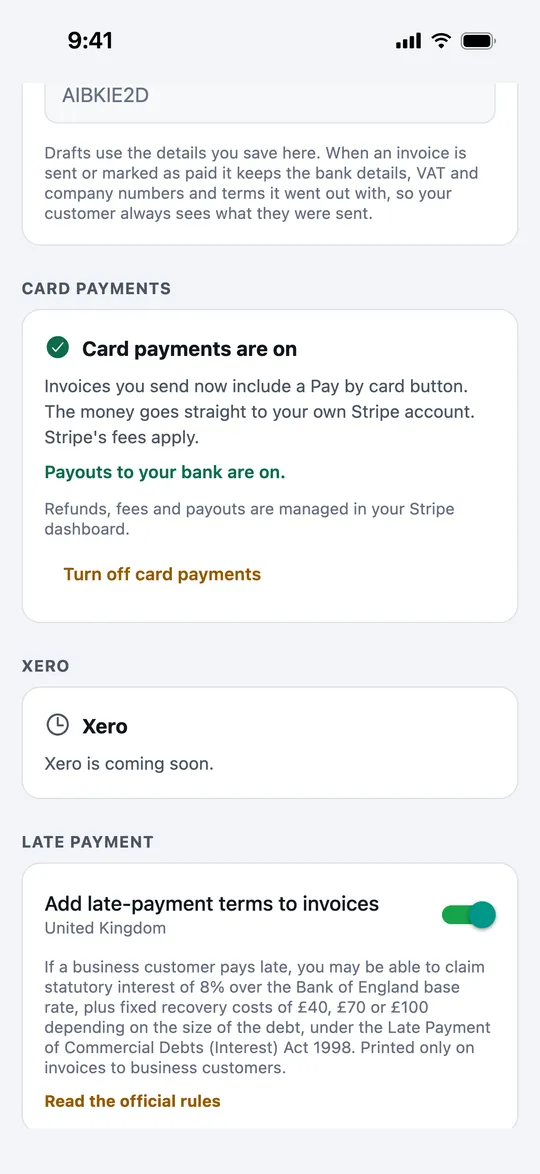
Late-payment terms, one switch
- Add late-payment terms to invoicesOne switch in Invoice settings, set for the United Kingdom.
- The wording is written for youStatutory interest and the fixed recovery costs, printed only on invoices to business customers.
- The official rulesA link to read them sits under the switch.
Will I know when an invoice is paid?
Yes, if you switch on Office alerts in Settings. Each person picks their own, and nobody is told about something they did themselves.
Invoice paid
A customer paid by card: who, which invoice and how much.
Deposit paid
A customer paid the deposit, so the job can go ahead.
Refunds
A refund made in Stripe has been recorded on the invoice.
Money alerts go to the owner and anyone with the Invoices and quotes tick. More on the owner dashboard, your accountant’s login and plans and prices.
Common questions
No. Maintivo asks you whether each invoice has been paid. A reminder goes to your customer only when you tap No, send a reminder, so you stay in control of every customer.
At most twice. Before the due date (a third of the time to pay before it, at least 1 day; on the due date if there were 2 days or fewer to pay), and the day after the due date. Never on the day the invoice was sent.
A short, polite reminder with the invoice and how to pay. It needs the customer's email address on the invoice.
From the day after its due date. Drafts are never overdue, a part-paid invoice is overdue for the balance, and a fully credited invoice is treated as settled.
In the UK, Maintivo prints the statutory late-payment terms on invoices to business customers: interest of 8% over the Bank of England base rate, plus recovery costs of £40, £70 or £100. Ireland and the EU have their own version; elsewhere you set your own late fee terms.
The owner, and anyone the owner gives the Invoices and quotes tick.
Yes, in every plan, from £34.99 a month.
Do your next report in Maintivo
Your first report is free to fill in, with no card and no training day. Run a real visit through it and see.
iPhone: No card. No account. First report free to fill in.In your browser: Free account, no card. First report free to fill in.