 Maintivo

The facilities management inspection app: every site, the same record
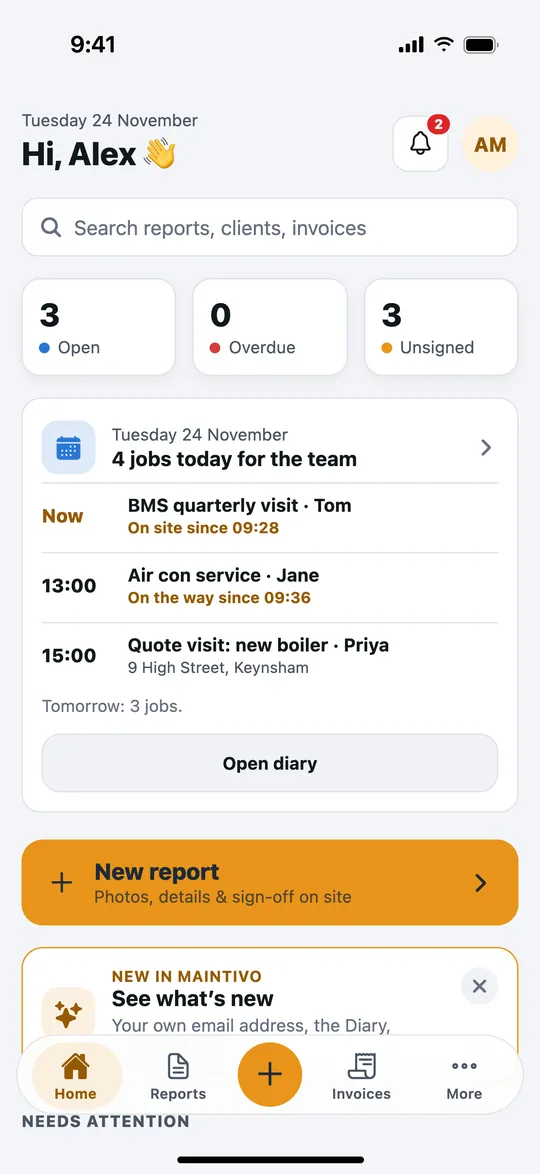
Maintivo is a facilities management inspection app that keeps a consistent, signed, audit-ready record across every building you look after. FM lives on evidence, so when a client, landlord or insurer asks for last year's record, it is a search rather than a hunt.


iPhone: No card. No account. First report free to fill in.In your browser: Free account, no card. First report free to fill in.

See a finished report before you download anything
One of the reports Maintivo produces (this one is an F-Gas leak check). Every report carries your letterhead, the job details, your findings and both signatures.
Site inspections, on the phone
Real screens from the iPhone app with a sample job.
- 1
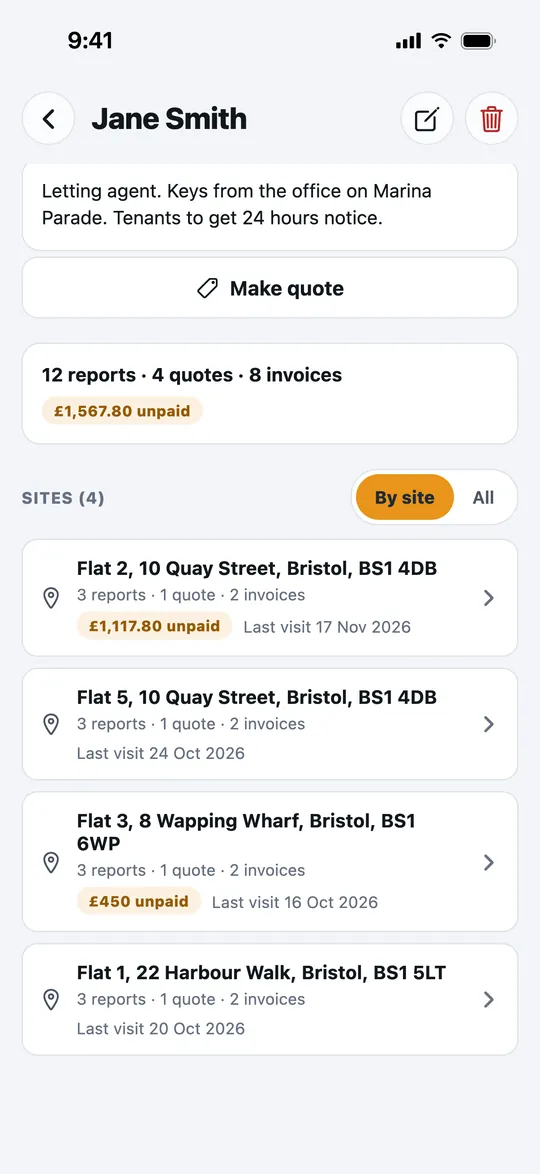
Every site for a client
With its reports, quotes, invoices and last visit.
- 2
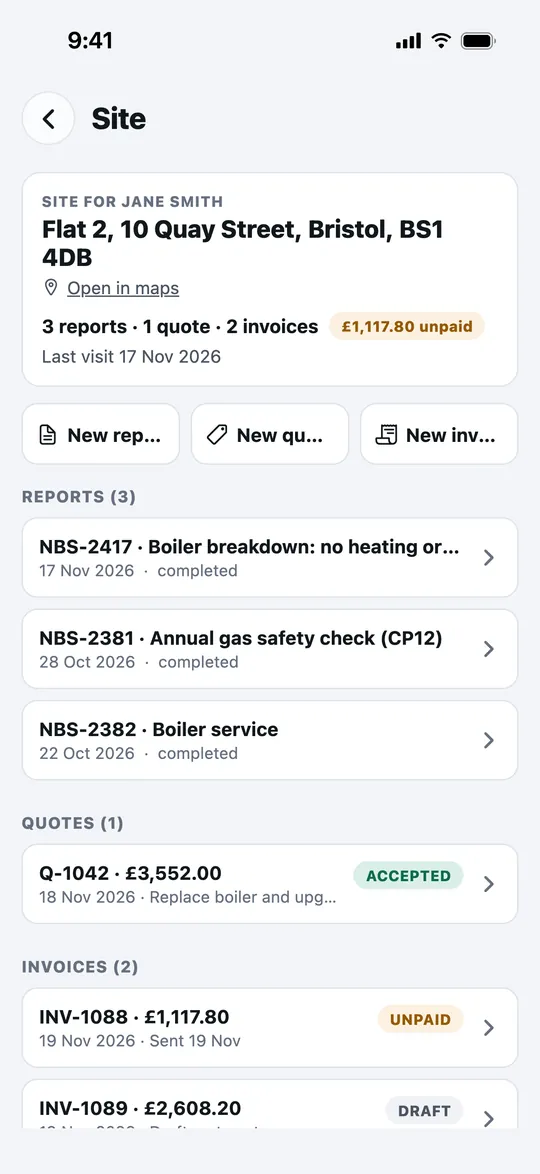
One site’s history
Every report, quote and invoice there.
- 3
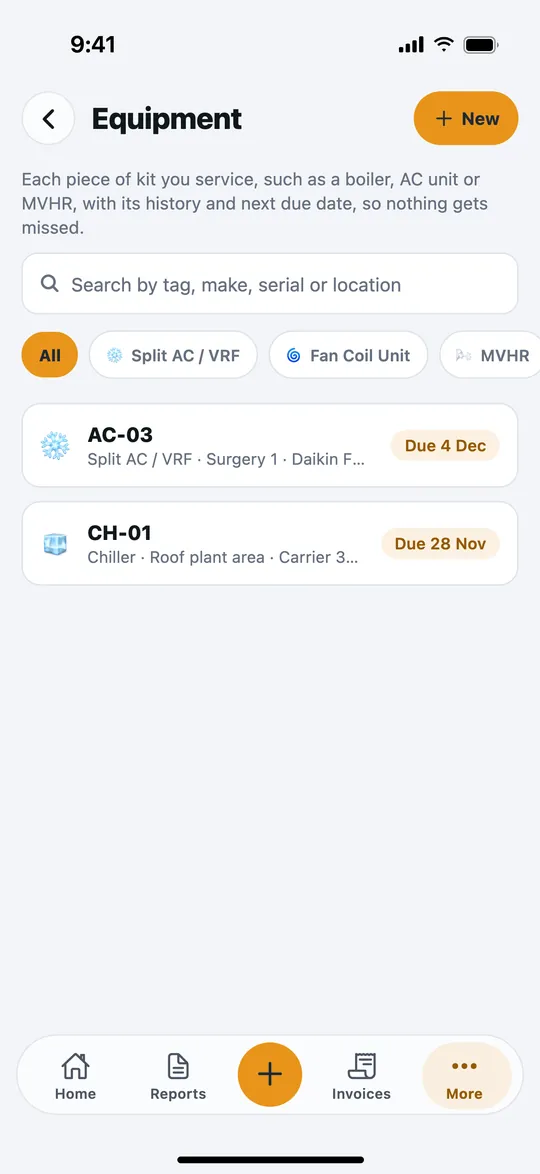
The kit on site
Due dates, marked.
- 4
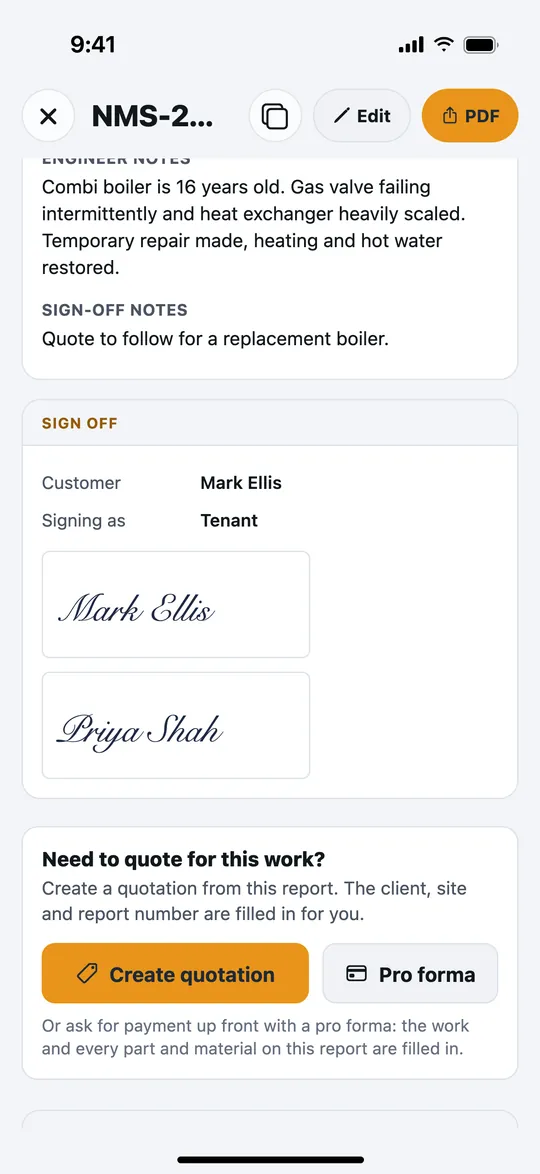
Signed before you leave
The customer and the engineer sign on the screen, then the PDF goes out.
On your iPhone on site. On Android, a tablet or the office computer too.
One account for the whole firm. A report an engineer finishes on site is on the office screen as soon as it uploads, and a customer added at the desk is on every phone.
Engineers pay nothing themselves: the owner invites them, and the company's plan covers them. Engineers see only their own jobs. The owner sees everything and chooses what each person can see. Your accountant can have their own free login to the invoices and reports.
- iPhone: the app. It works with no signal and uploads when you are back in range.
- Android phones, iPads and other tablets: the web app at app.maintivo.com. Add it to the home screen and it opens like an app.
- Laptop or desktop: the same web app on a big screen, for reviewing reports, clients, invoices and the team.
- Always in step: the same reports, customers and PDFs everywhere. One subscription covers all of it.


The site-visit paperwork problems it fixes
BeforeEach site has its own paper checklist and nobody fills it in the same way.
With MaintivoOne template per inspection type, used the same way at every site.
BeforeThe client asks for last quarter’s inspections and you start digging.
With MaintivoEvery record is searchable by site, client and date, and ready to re-send.
BeforePlanned maintenance dates are in a spreadsheet nobody opens.
With MaintivoEach asset has its next due date in the equipment register, with reminders.
BeforeEvidence of the work done is scattered across phones.
With MaintivoPhotos go straight into the report, with the time they were taken.
The question that ruins a Tuesday
"Can you send us the record from last year for the third floor?"
- A shoebox, an old laptop or a former employee's phoneIf the answer involves one of those, you have a problem. Not a compliance problem yet, but it is on the way.
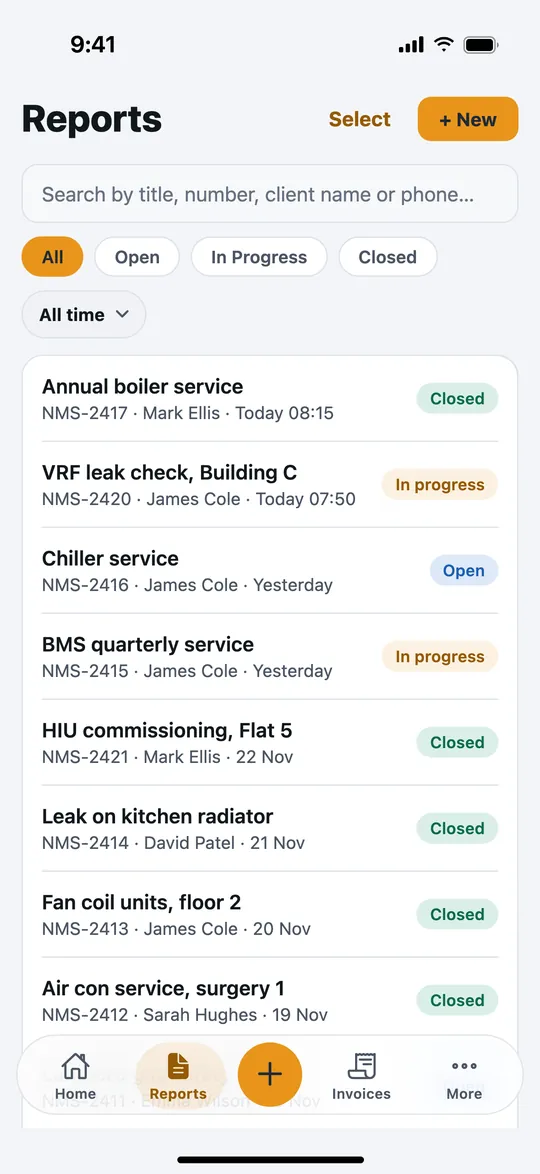
Last year’s record is a search
- Search every reportBy title, number, client name or phone.
- Filter by statusAll, Open, In Progress or Closed, and by date.
What does a facilities management inspection app record?
Every inspection you carry out is captured against the client and the site:
- The checks
- The photos
- The readings
- The signature
- The branded PDF that went to the customer
Not scattered
Not in an inbox. Not on a phone that left with an engineer.
In one place
In one format, for every building you hold. It is searchable and stored in the UK (London) with our database provider, private to your company.
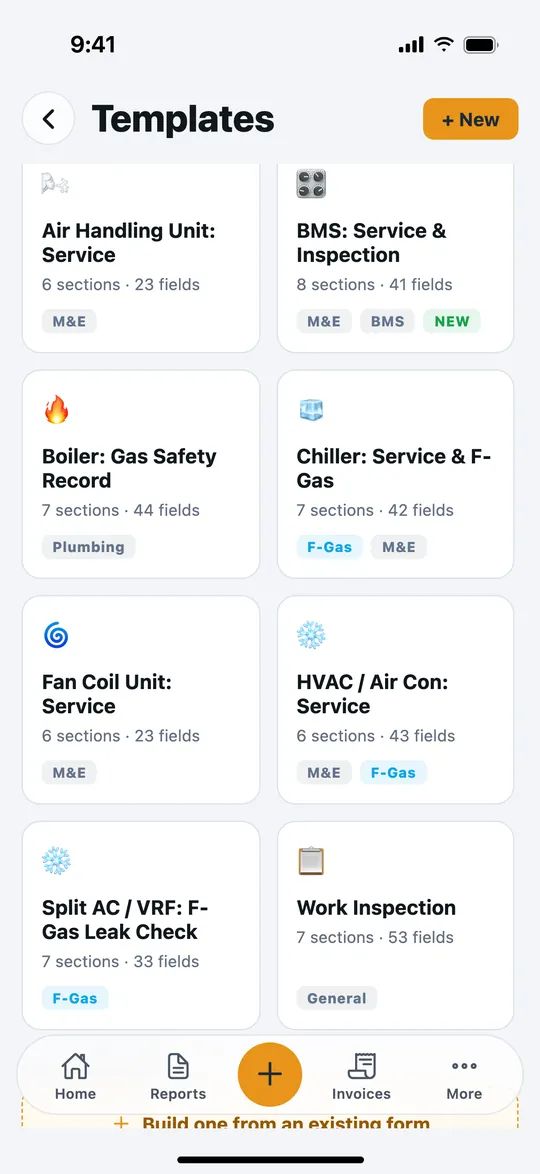
A form for each kind of visit
- Work Inspection7 sections and 53 fields for a general site inspection.
- Plant and building servicesAir handling unit, BMS, chiller, fan coil unit, HVAC and gas safety forms in the same library.
- Your ownBuild one from an existing form, and every engineer uses it.
Consistency across a portfolio
A shared template means the inspection of site A looks like the inspection of site B, even if different engineers walked them six months apart.
- A defensible recordThat consistency is what turns a pile of visits into a defensible record.
Works in the parts of buildings that have no signal
Plant rooms, basements, risers, roof spaces. The iPhone app captures the whole inspection offline and uploads it when the engineer walks back out.
iPhone app
Pending uploads are visible on the home screen, so nothing sits unnoticed.
Web app
It needs a connection and keeps a draft in the browser.
Engineers see the job, not the contract value
Subcontractors and engineers on your team have no access to invoices, pricing or company settings.
What they see
Their jobs and the capture screens.
What stays with the owner
The commercial side, by default.
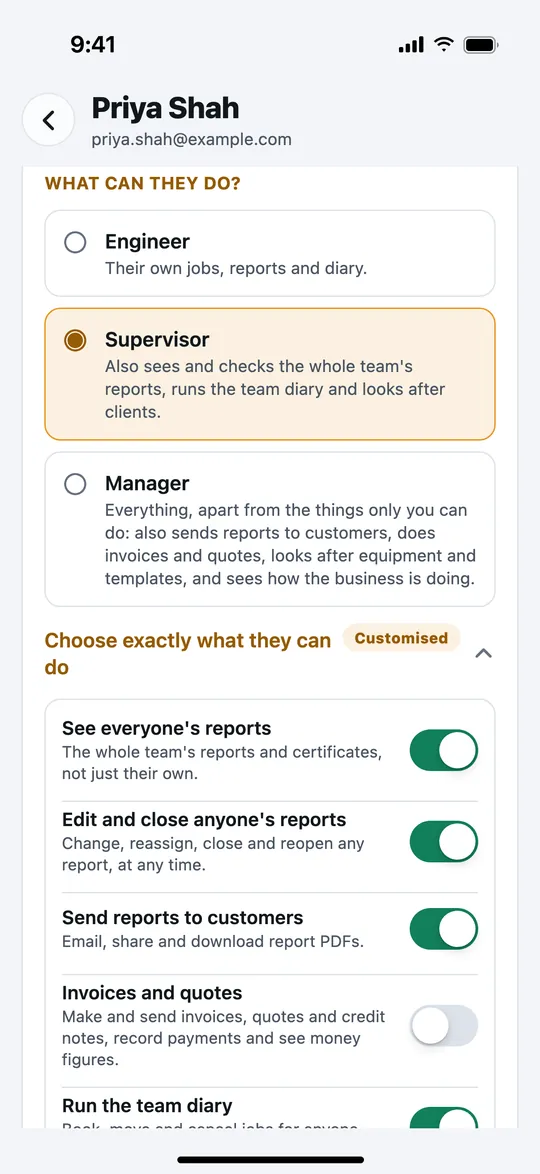
Choose what each person sees
- Engineer, Supervisor or ManagerEach level is explained on the screen.
- Invoices and quotes offThe person does not see invoices, quotes or money figures.
Every asset, every site, every due date
FM lives or dies on knowing what is due and proving what was done.
The asset register
Every unit your engineers touch goes into an asset register with its next-due date.
iPhone notifications
The owner gets one at ninety days, at thirty days and again if it goes overdue (optional, switched on in Settings).
On the web
What is due shows on the dashboard, and you can switch on browser reminders.
When a client asks whether the plant on the third floor is in date, it is a look, not an afternoon.
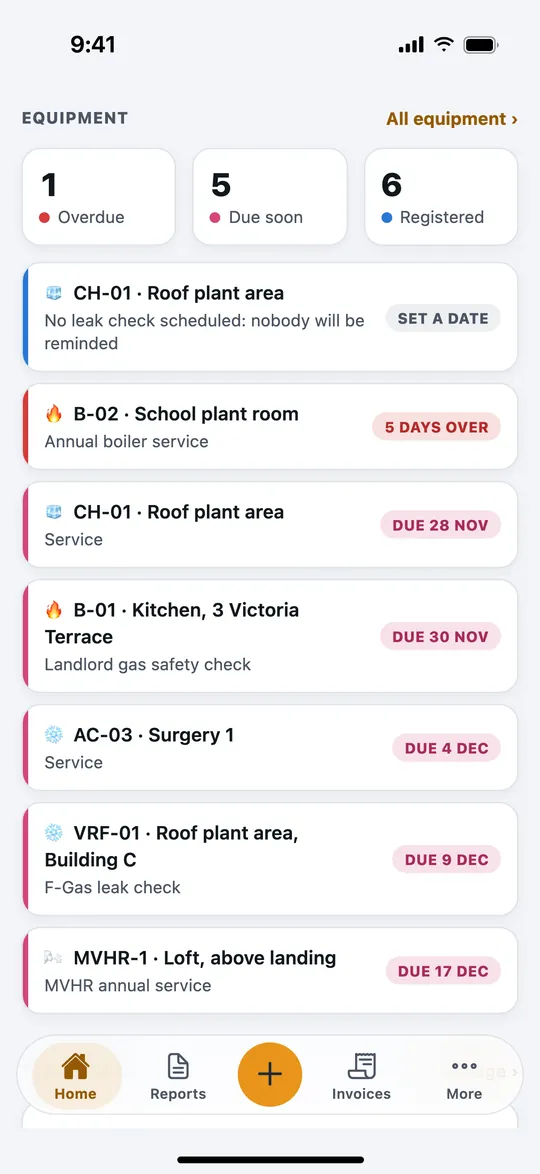
What is due across every site
- Counted at the top1 overdue, 5 due soon and 6 registered.
- Each unit with its placeRoof plant area, school plant room, surgery 1, loft: each with its due date.
- Nothing scheduled? It says soA unit with no leak check date shows Set a date.
The compliance maths, not left to the engineer
On the F-Gas forms the engineer picks the refrigerant and enters the charge. Maintivo does the sums.
Applies the GWP
Maintivo applies the GWP and converts the charge into tonnes of CO₂e.
Works out the interval
It works out the leak-check interval under the Great Britain F-gas rules.
Sets the date
It writes the next-check date against the unit.
Consistency across a portfolio stops depending on which engineer went out that day.
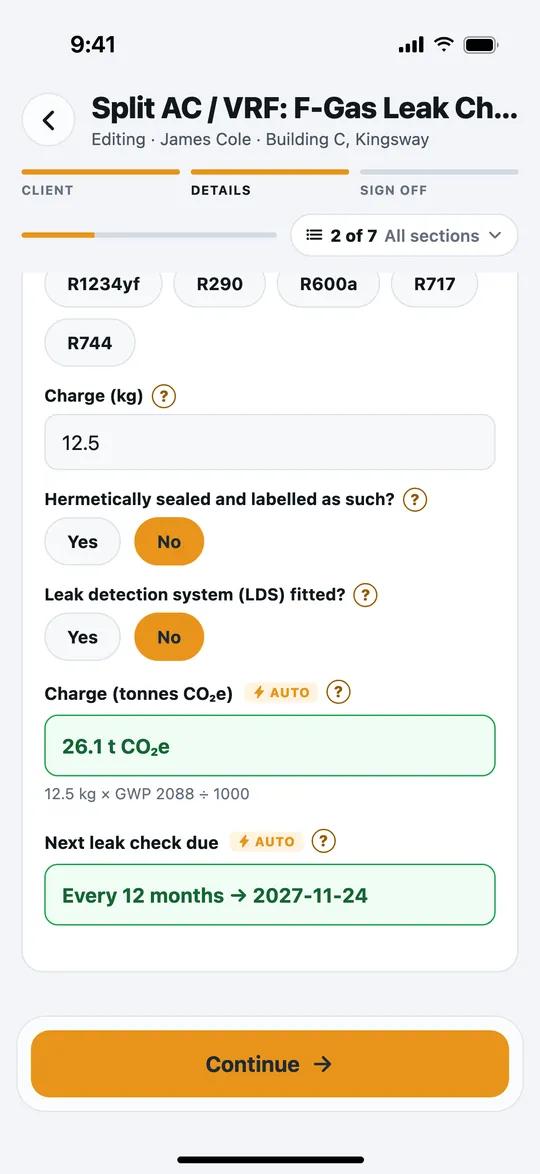
The sum, done and shown
- Tonnes of CO₂e12.5 kg × GWP 2088 ÷ 1000 = 26.1 t CO₂e, printed on the form.
- The interval and the dateEvery 12 months, with the next check date filled in.
Evidence a client can actually read
On iPhone, engineers dictate their findings straight into the record, and the optional AI tidies the wording into something a client or an insurer can follow.
- On the phoneDictation uses Apple's on-device speech recognition, so the audio never leaves the phone.
- Kept to prose, off by defaultThe AI is confined to prose and off until you switch it on.
- Numbers are protectedWhen a note is dictated, numbers are swapped for placeholders before it is sent (a typed note is sent as typed), and any suggestion that adds a number is rejected.
Maintivo produces and keeps the record; the registered engineer signs it and remains the competent person.
Common questions
Yes. Every signed report and photo is stored against the client and site in searchable cloud storage, so an old record is a search rather than a hunt.
Yes. Shared templates mean every engineer captures the same fields in the same order, so inspections across a portfolio match.
Records are stored in the UK (London) with our database provider, private to your company. Our privacy policy lists every provider we use.
Yes. Every asset sits in the equipment register with its next due date. The owner can get an iPhone notification at 90 days, at 30 days and when it is overdue, and the web app shows what is due.
Yes. Every visit produces its own signed PDF with your logo, and the owner, or anyone allowed to send reports, can email it to the client or an accounts address.
Yes, through the web app at app.maintivo.com, which runs in the browser on Android phones, tablets and computers and can be added to the home screen. It is the same account as the iPhone app. The iPhone app works with no signal; the web app needs a connection to save.
Solo is £34.99 a month for one person, Team is £59.99 for up to 3 people and Team 10 is £99.99 for up to 10, with invoicing included and no contract. Every plan starts with 14 days free, and your first report is free to fill in. See pricing.
Next steps: see Maintivo pricing, read how Mainteniq uses Maintivo on live jobs, or look at M&E inspection software and the BMS service report.
Have the report ready before you leave the drive
Your first report is free to fill in, with no card and no training day. Run a real job through it and see.
iPhone: No card. No account. First report free to fill in.In your browser: Free account, no card. First report free to fill in.