 Maintivo
Job sheets and site reports for small service firms
The quick way to turn a job into a professional report.
Fill in the job on your phone while you are on site. The report is done before you leave, not typed up at the kitchen table at 9pm. No more paper job sheets that get lost, wet or unreadable.
Works oniPhoneiPadAndroidTabletComputer


iPhone: No card. No account. First report free.In your browser: Free account, no card. First report free.Your first report takes minutes. To export and send PDFs you start Pro: a free trial, then £34.99 a month. No contract.
- Done before you leave the job
- Works with no signal on iPhone
- Your logo and company details on every PDF
- iPhone app, plus Android and any browser
Sound familiar?
The paperwork costs you more time than the job
It is the part of the work nobody pays you for. Here is where the time goes, and what Maintivo does about it.
BeforeThe job takes an hour. Typing it up takes the evening.
With MaintivoThe report is finished on site. You fill in the form once, as you work, and the PDF is built from it. Nothing to type up tonight.
Before“You never did that.” And you have nothing signed to show.
With MaintivoThe customer signs on your phone before you leave, and the photos carry the date and time. No going back over an old job to prove what you did.
BeforePaper job sheets go missing in the van, or come back too wet to read.
With MaintivoEvery job is numbered and stored against the customer. Last year's report is a search, not a hunt through the van.
BeforeThe job was done on Monday. The invoice went out the week after, once the paperwork caught up.
With MaintivoWith the invoicing add-on, the finished report becomes an invoice with VAT, deposit and payment terms. It can go out the same day, and you can see which ones are overdue.
How it works
Pick a form. Tap through it. Send the PDF.
A report takes minutes, and you do it while you are still on the job. No training day and nothing to set up first.
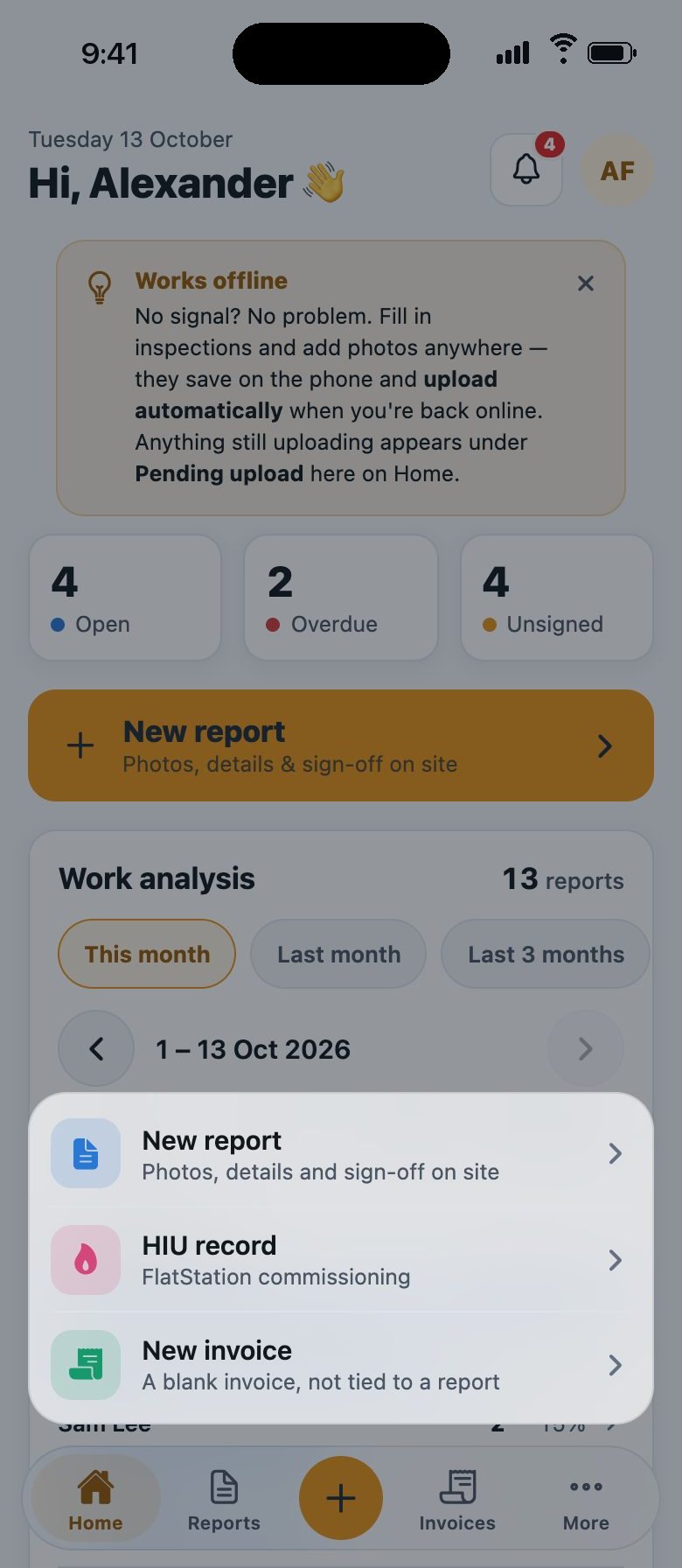 1
1Pick a form and the customer
Tap the plus and choose a form. Customers and sites are saved, so there is nothing to type twice.
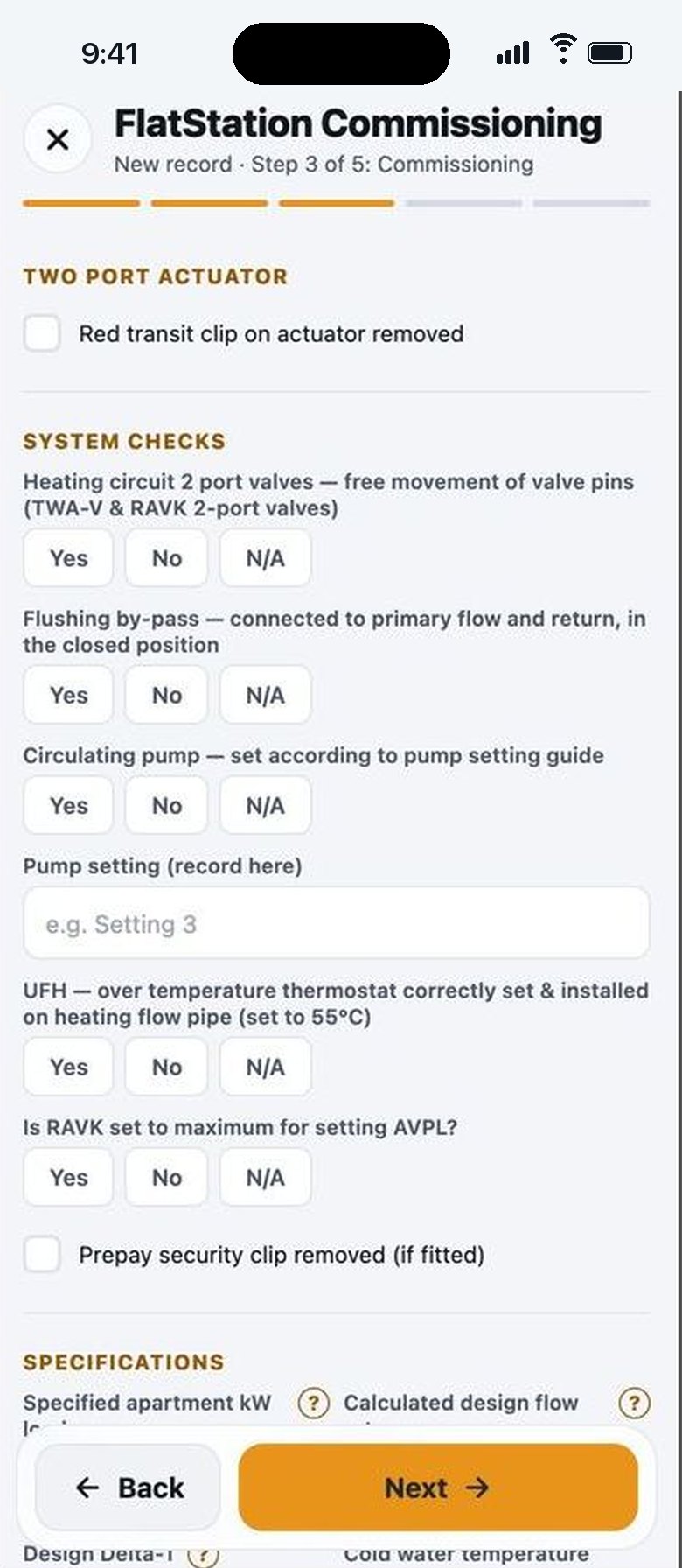 2
2Tap through the job
Yes, no or not applicable, with a note. Photos go into the report as you take them. On iPhone you can dictate your notes.
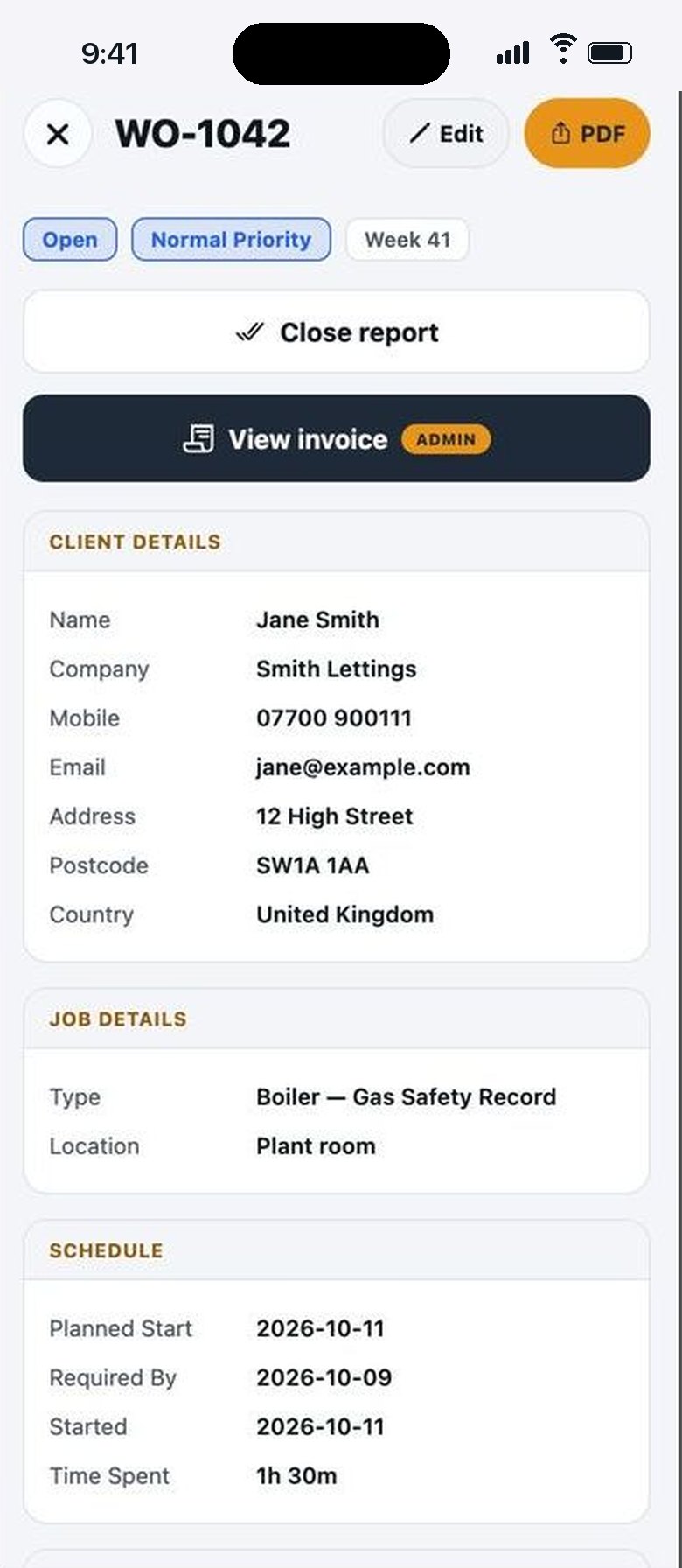 3
3Sign, and the PDF is ready
You sign, the customer signs on the screen, and the report is done. One tap makes the PDF with your logo.


Real screens from the iPhone app, with a sample account. The names are made up.
The app
One app for the job, the paperwork and the team
Your team
You see every job. Engineers see only their own.
Invite an engineer by email and they are filling in reports on their own phone the same day. They get their jobs and your forms. They never see your customers list, your prices or your invoices.
- Open, overdue and unsigned reports at the top of your Home
- Only you or an admin can send a report to the customer
- Everyone in step: a finished report is on your screen as soon as it uploads

Invoicing add-on
From finished report to invoice in one tap.
Open a signed report and turn it into an invoice with VAT, a deposit and payment terms. See what is unpaid and overdue without opening a spreadsheet. The reports work without it.
- Invoice the job the day it is done
- Charged, outstanding and paid, for any month
- Your bank details printed on every invoice


Equipment
Nothing due gets forgotten.
Every boiler, AC unit and heat interface unit you look after sits in a register with its history and its next due date. Start the next visit from the unit and its details are already filled in.
- Overdue and due soon, at a glance
- F-Gas leak check dates worked out for you
- Reminders at 90 days, 30 days and overdue on iPhone

For the owner
See where the work goes.
Work analysis counts your reports by engineer, area, client or work type, for this month, last month or any dates you pick. Tap a row and the reports behind it open.
- Who did what, and how much of it
- Which clients and areas keep you busiest
- Your forms, ready-made or built by you


What your customer gets
A professional PDF, with nothing left to do tonight
It looks like a bigger firm sent it: your logo, clear sections, both signatures. This one is real output from Maintivo, made from a sample job, with nothing touched up. Open it and judge it before you download anything.
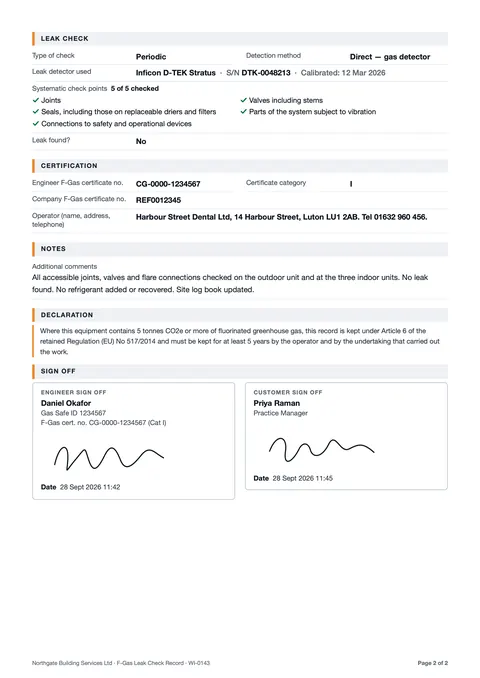 Checks and sign off
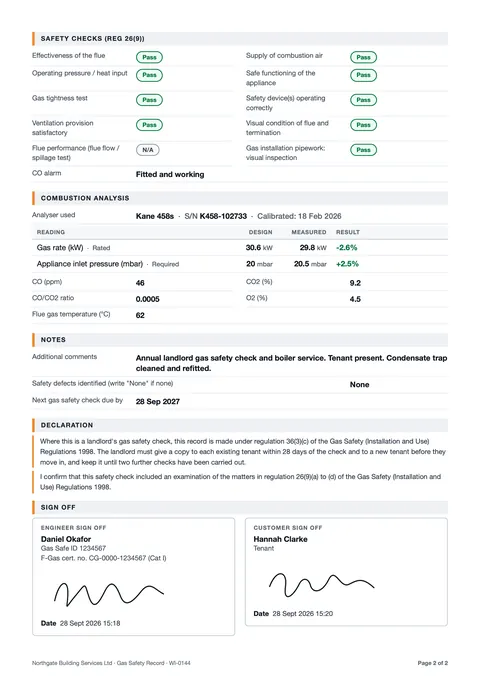 Gas Safety Record
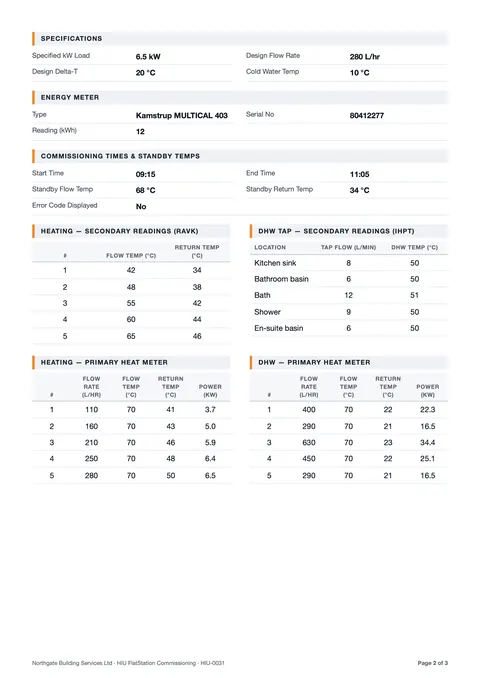 HIU commissioning
Sample reports: fictional customer and data. Northgate Building Services and Harbour Street Dental are made up.
It looks like your company sent it
Your logo, company details and registration numbers sit at the top of every report. Set them once.
Nothing is cut short
Full customer, site and equipment details at the top, then clear sections with page breaks in the right places.
Findings are written up properly
When something fails, the record holds what you found, what you did, a priority, and the photos you took, with the time they were taken.
Signed by you and the customer
Both signatures are captured on the screen, with the date and time. The engineer's name prints beside theirs.
The sums are done for you
No calculator on site. Readings sit beside their design figures, with anything out of tolerance flagged. On refrigerant work it works out the tonnes of CO₂e and the next leak check date.
Numbered and kept
Every report gets its own number and is stored against the client, so last year's record is a search away.
iPhone: No card. No account. First report free.In your browser: Free account, no card. First report free.Do one real job and see your own report. It takes minutes.
Ready-made forms
Ready-made forms for your trade. Nothing to set up.
Start with the general job sheet: it covers most visits. When the work needs a specific record, the form is already there, with the right fields in the right order.
General job sheet
Any job: what you found, what you did, photos and a signature. The work inspection form fits most visits.
Job sheet app →Gas and heating
Boiler service and the Gas Safety Record (CP12), with appliance checks and combustion readings.
Gas engineer app →F-Gas and air con
Split AC, VRF and chiller service with the leak check. CO₂e and the next check date worked out.
F-Gas leak check app →HVAC
Air conditioning, air handling unit and fan coil service, with readings against design figures.
HVAC inspection app →HIU and heat networks
A step-by-step HIU commissioning record: checks, flow and return temperatures, heat meter readings.
HIU commissioning →Plumbing
Call-outs, repairs and services: the problem, the photo, what you did and the customer's signature.
Plumbing report app →Facilities and maintenance
Planned and reactive visits across the sites you look after, each one a signed record you can find again.
Facilities inspection app →Build your own
Your sections, your questions. Match the job sheet you use today in a few steps.
How the form builder works →More: work inspection app, CP12 gas safety record app, MVHR and fan coil, mechanical and electrical, or all trades and all features.
Plain facts: Maintivo helps you record the job properly and shows its working. You remain the competent person and you sign the record. It does not certify work and it is not legal advice. There is no electrical form, so no EICRs.
Every device, one account
On your iPhone on site. On Android, a tablet or the office computer too.
One account for the whole firm. A report an engineer finishes on site is on the office screen as soon as it uploads, and a customer added at the desk is on every phone.
- iPhone: the app. It works with no signal and uploads when you are back in range.
- Android phones, iPads and other tablets: the web app at app.maintivo.com. Add it to the home screen and it opens like an app.
- Laptop or desktop: the same web app on a big screen, for reviewing reports, clients, invoices and the team.
- Always in step: the same reports, customers and PDFs everywhere. One subscription covers all of it.


Which one do I use?
No signal? Keep working. It uploads by itself later.
Plant rooms, basements, lofts, new builds. On iPhone the job saves on the phone, so you never stand around waiting for a bar of signal. Android and desktop use the web app, with the same account and the same reports.
iPhone
The app
- Works with no signal. Reports, photos and signatures save on the phone and upload when you are back in range.
- Dictate your notes instead of typing.
- No card. No account. First report free.

Android, iPad, computer
The web app
- Opens at app.maintivo.com. Nothing to install, or add it to your home screen and it opens like an app.
- Same forms, same PDF, same account as the iPhone app.
- Needs a connection. It keeps a draft in the browser while you fill it in.
- Free account, no card. First report free.
For the office
Less chasing paperwork. Your team on one account, with you in control.
Built for firms of one to five engineers. Reports arrive finished, so nobody rings round on a Friday asking for job sheets.
You see everything. You decide what goes out.
Every report is in front of you the moment it uploads. Engineers fill in their own jobs and see only those: no client list, no invoices, no billing. Only the owner or an admin can send the PDF to the customer, close a report or delete one.
Customers and sites saved, never retyped
Add a customer once on site and they are there for the next visit. Start a repeat visit from a unit in your equipment register and its details are already filled in.
Nothing due gets forgotten
Every unit you look after sits in an equipment register with its next due date. Owners can get an iPhone notification at 90 days, at 30 days and when it is overdue. On the web, what is due shows on the dashboard.
See where the work goes
Work analysis counts your reports by engineer, area, client or work type, for this month, last month or any dates you pick. Tap a row and the reports behind it open.
What needs you comes first
Home opens on what is open, overdue and unsigned, with a needs attention list under it. On the web, reports waiting for your review have their own filter.
Invoice the job the day it is done
With the optional invoicing add-on, a finished report becomes an invoice with VAT, deposit and payment terms. No waiting for the paperwork to catch up. The reports work without it.
How we compare
Built for small firms, not scaled down from a big one
Certificate apps do one form. Big job management platforms run a whole office and take weeks to set up. Maintivo sits between them: every job report a small firm writes, finished on site.
| What you get | Certificate-only apps | Maintivo | Big job management platforms |
|---|---|---|---|
| Made for | One engineer, one kind of certificate | Sole traders and firms of up to six: the owner plus five engineers | Larger firms with office staff |
| What you can record | A fixed set of certificates | Any job: job sheets, services, inspections, gas, F-Gas and commissioning records, or your own form | Almost anything, once it is configured |
| Getting started | Minutes | Minutes. No demo call and no training day. Your first report is free | Often a demo, onboarding and training first |
| The office view | Usually none | The owner sees every report, what is overdue and who did what. Engineers see only their own jobs | Full scheduling, dispatch, stock and CRM |
| Where it runs | Usually phone only | iPhone app that works with no signal, plus a web app for Android, tablets and computers, on one account | Apps and a web office system |
| The price | Low, per engineer | £34.99 a month for the owner, seats from £8.99. Monthly, no contract | Per user, often with a contract or a minimum team size |
| What it does not do | Job reports, a team view, invoicing | Scheduling, quoting and stock. If you need those, a bigger platform is the right choice | Stay simple for a firm of three |
A fair summary of each kind of product, not of any one company. See the detail: Maintivo and the big platforms, or against Tradify, Commusoft, Joblogic and simPRO.
Price
£34.99 a month for you. Add engineers when you need them.
Monthly, no contract. Weigh it against the evenings you spend typing up reports. Three real examples:
Just you
£34.99 / month
Pro £34.99
You + 3 engineers
£59.98 / month
Pro £34.99 + 3 seats £24.99
You + 5 engineers
£69.98 / month
Pro £34.99 + 5 seats £34.99
Your first report is free. Pro has a free trial. Invoicing is an optional extra at £9.99 a month. Engineers never pay: you buy their seats. App Store prices include VAT. More than five engineers? Email us.
See full pricingWho uses it
Built with a firm that wanted its evenings back
We are not going to show you a wall of logos we do not have. Here is what is real.
“We wanted to make our engineers' jobs easier and get our evenings back. Maintivo captures the job on site and the report is done before we leave.”
- See the output firstThe report pages above were produced by the app's own report builder, with sample data.
- Try it on a real job for nothingYour first report is free. If it does not save you the write-up, you have lost nothing.
- A registered UK companyBoroto Ltd, company no. 15171190, Leighton Buzzard. Email support@maintivo.com and a person answers. About us
- On the App Store nowIt is too new to have a pile of reviews. We would rather you judged it on your own job.
iPhone: No card. No account. First report free.In your browser: Free account, no card. First report free.If it does not save you the write-up tonight, you have lost nothing.
Questions
Fair questions, straight answers
How long does a report take?
Minutes. You tap through the form while you are doing the job, so when the work is finished the report is finished too. There is nothing to type up afterwards.
Is it hard to set up?
No. There is no training and nothing to configure before you start. On iPhone, open the app and you see a finished report straight away, which you can edit as your own: no sign-up and no card. Pick a ready-made form and do a real job. Add your logo and company details once, when you are ready.
Does it work with no signal?
On iPhone, yes. The report, photos and signatures save on the phone and upload when you are back in range. The web app needs a connection to save, and keeps a draft in the browser while you fill it in.
Can I use my own job sheet?
Yes. You can build your own form in a few steps: your sections, your questions. If you use a paper job sheet today, build a form that matches it and carry on as you were, without the paper.
What does it cost per engineer?
Pro is £34.99 a month and covers you, the owner. Each engineer needs a seat: 1 seat is £8.99, 3 seats are £24.99 and 5 seats are £34.99 a month, one pack at a time. So you plus three engineers is £59.98 a month. Engineers do not pay anything themselves. More than five engineers? Email support@maintivo.com.
Can I cancel?
Yes. It is monthly, with no contract and no exit fee. A subscription bought in the iPhone app is cancelled in your Apple ID settings. One bought by card is cancelled under Plan and billing in the web app.
Is my data safe, and is it mine?
Your records are stored in the United Kingdom and handled under UK GDPR. Every report is a PDF you can save and keep. The privacy policy says exactly who processes what.
Is it really free to try, and what happens after?
Your first report costs nothing and needs no card. On iPhone you do not even need an account to start; in a browser you make a free account with your email or Google.
To export and send PDFs, and to keep making reports, the owner starts Maintivo Pro, which has a free trial for new subscribers. On iPhone the trial runs through your Apple ID, and it becomes £34.99 a month unless you cancel at least 24 hours before it ends.
What is Maintivo?
A job sheet and report app. You fill in a form on site, add photos and signatures, and get a clean PDF with your logo on it before you leave. It is for engineers and small service firms: heating, air conditioning and HVAC, plumbing, gas, building services and maintenance.
What kind of jobs can I use it for?
Any job that ends with a record for the customer: a service visit, a repair, an inspection or a commissioning. There is a general job sheet and work inspection form, plus ready-made forms for HVAC and air conditioning service, air handling units, fan coil units, boiler service and the Gas Safety Record, split AC, VRF and chiller service with the F-Gas leak check, and MVHR and HIU commissioning.
Can I put my own logo on the reports?
Yes. Your logo, company details, VAT number and registration numbers go on every report. The customer sees your company, not ours.
How does the customer get the report?
The app builds the PDF on site. The owner shares or emails it from their phone, or from the web app. It is not sent automatically, so nothing goes out until you have looked at it.
Does it work on Android?
Yes. There is no Play Store app. You open app.maintivo.com in Chrome and use it there, and you can add it to your home screen so it opens like an app. It is the same account and the same reports as the iPhone app. The web app needs a connection.
Can I pay by card instead of through Apple?
Yes. You can subscribe in the iPhone app through Apple, or by card in the web app under Plan and billing. The prices are the same, and one subscription unlocks both the iPhone app and the web app for you and your team.
I am on paper, Word or a spreadsheet now. How hard is it to switch?
There is nothing to migrate before you start. Do your next job in Maintivo and compare the result with what you send today. If you have your own job sheet, you can build a form that matches it.
Does the AI write my report?
No. There is an optional tool that tidies the wording of a note. It is off until you turn it on, and you see the suggestion before it is used. When you dictate a note, numbers are swapped for placeholders before it is sent; a typed note is sent as typed. Any suggestion that adds a number is rejected.
What does it not do?
It does not schedule jobs, track van stock or do your accounts. It does not certify work, and there is no electrical form, so no EICRs. It does job sheets, inspections, reports, equipment due dates and, if you want it, invoices. If you need a full job management system, this is not it.
More answers on the full FAQ page, or see how it compares with the big job management platforms.
Next job
Do your next report in minutes. The first one is free.
Fill it in on the job, send it before you leave, and keep your evening. If it does not save you the write-up tonight, you have lost nothing.
iPhone: No card. No account. First report free.In your browser: Free account, no card. First report free.Questions first? Talk to us or email support@maintivo.com.