 Maintivo

Maintivo in Australia
Maintivo works for maintenance and trade firms in Australia: invoices in Australian dollars with GST and your ABN, postcode and state on every address, your own state's time zone in the Diary, and card payments into your own Australian Stripe account. Choose Australia once and the app follows it.


iPhone: No card. No account. First report free to fill in.In your browser: Free account, no card. First report free to fill in.
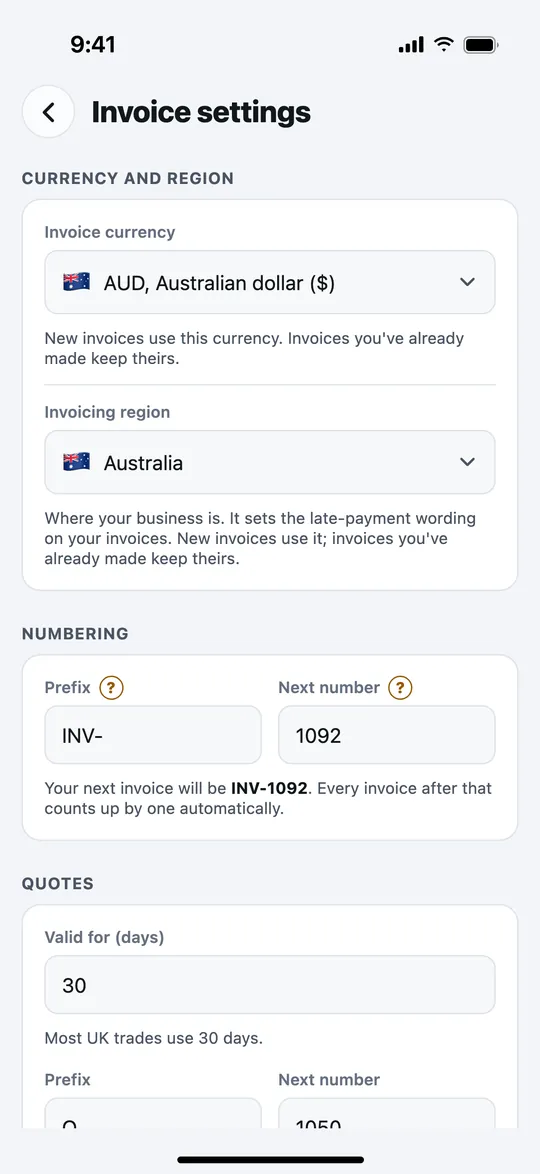
- Choose Australia as your country: Maintivo suggests it when you sign up, and you can change it in Settings, under Country and time zone.
- Money in A$, tax called GST, and your tax number printed as ABN.
- Addresses ask for a postcode and state.
- Ready-made forms and refrigerant rules for your country, with no UK law on them.
- Card payments into your own Australian Stripe account.
What changes for a firm in Australia?
Maintivo is made in the UK, and your country decides the money, the tax words, the addresses, the clock, the forms and the refrigerant rules. Pick Australia once and every new invoice, quote and form follows it.
| Setting | In Australia |
|---|---|
| Currency | Invoices, quotes and credit notes are in A$. Card payments are taken in the invoice's own currency. |
| Tax | Invoices, quotes and credit notes say GST, and your number prints as ABN. GST starts switched off: turn on Registered for GST in Invoice settings and type your rate. |
| Addresses | Address fields on forms, clients and documents say Postcode and State instead of the UK's Postcode and County. |
| Time zone | Today, due dates and Diary times follow Sydney, Melbourne, Brisbane, Adelaide, Perth, Darwin or Hobart time, the same for everyone in your company. |
| Late payment | No statutory late-payment wording. You can add your own late-fee terms, which print on every invoice. |
| Ready-made forms | The general versions: Boiler: Service and Safety Check, Refrigeration: Leak Check, Chiller: Service and MVHR and Extract Ventilation: Commissioning, plus every form that is not tied to a country. The UK legal records are offered only to UK firms. There are no Australian legal forms built in. |
| Refrigerant leak checks | Maintivo shows the tonnes CO2e for the refrigerant and charge. It sets no Australian leak-check interval: the engineer sets the next date. |
| Card payments | Connect Stripe once and your account opens as an Australian Stripe account. Every invoice gets a Pay by card button. No Maintivo fee; Stripe charges its usual card fees. |
Example Services Ltd
ABN 00 000 000 000
Bill to
4 Example Street
Parramatta, State NSW
Postcode 0000
Changing country later
Change it in Settings, under Country and time zone. New invoices, quotes and credit notes follow the new country. Ones you have already made keep the money and the GST they were made with. If card payments are connected, disconnect them first, then connect again to open a Stripe account in the new country.
More on card payments on invoices and invoicing in Maintivo.
Set up for Australia, on the phone
Real screens from the iPhone app for a sample firm in Australia.
- 1
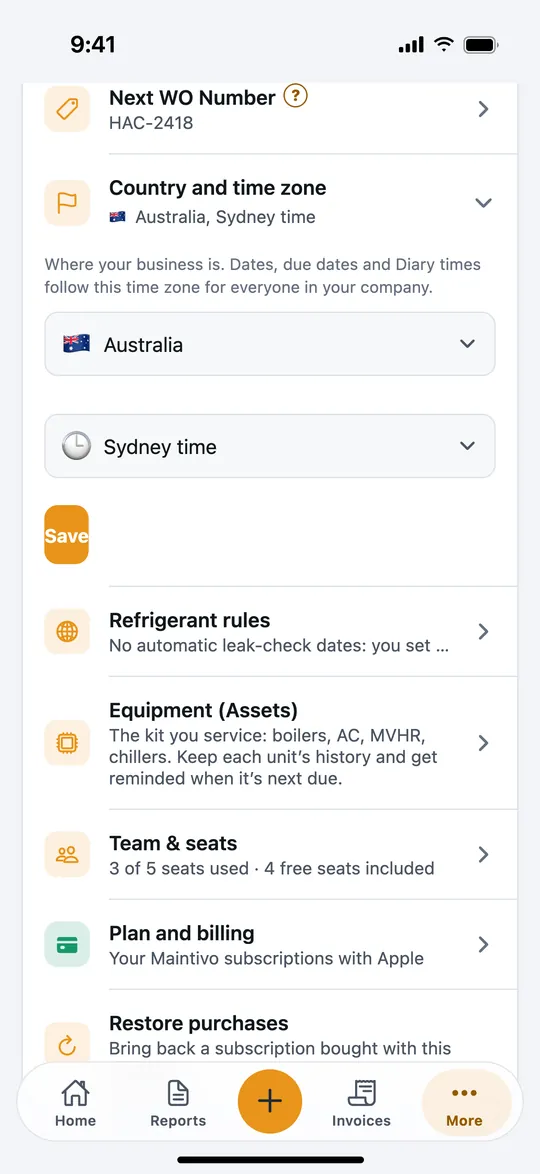
Your country and time zone
Dates, due dates and Diary times follow your own clock.
- 2
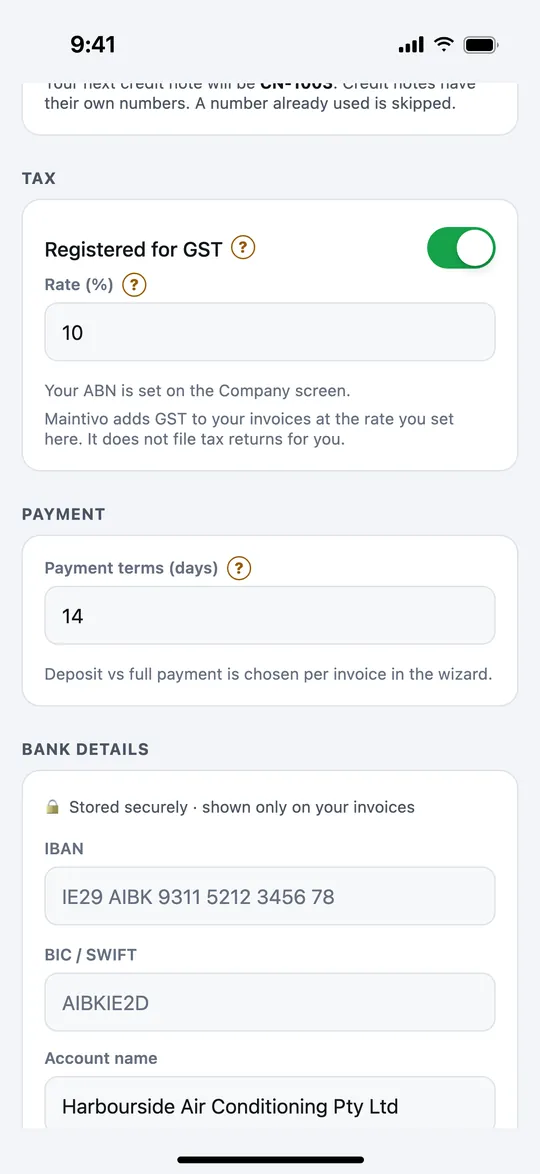
Your tax wording
The tax name and rate for your country, and your payment terms and bank details.
Which forms and refrigerant rules does a firm in Australia get?
- General ready-made formsBoiler: Service and Safety Check, Refrigeration: Leak Check, Chiller: Service and MVHR and Extract Ventilation: Commissioning: the same checks and readings as the UK forms, with the UK law taken out.
- Forms that work anywhereThe Air Handling Unit, Fan Coil Unit, HVAC / Air Con and BMS service forms, the Work Inspection checklist and the HIU commissioning form.
- Your own formsBuild a form that matches your own job sheet in the form builder. Your own forms always show, whatever the country.
- No UK certificatesThe Gas Safety Record, the UK F-Gas leak check certificate and the England ventilation sheet are UK legal records, offered only to UK firms.
Refrigerant leak checks
There is no single legal leak-check interval in Australia that Maintivo could apply, so it does not invent one. Pick the refrigerant and enter the charge, and it shows the tonnes CO2e. The engineer sets the next leak-check date, and Maintivo tracks it on the unit. The Refrigeration: Leak Check form has a field for the engineer's certificate or licence number, so your refrigerant handling licence prints on the record.

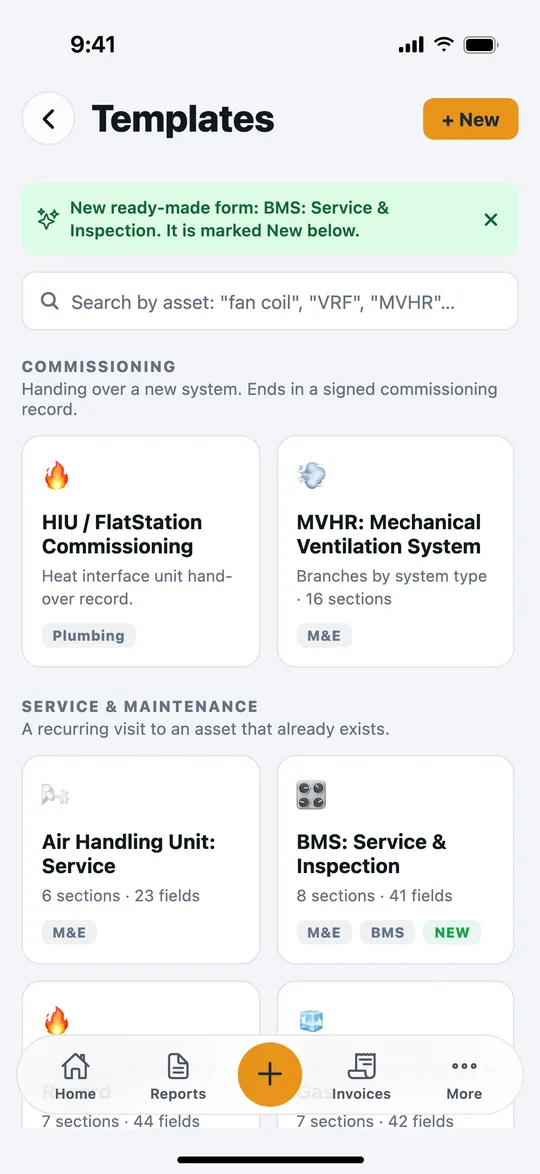
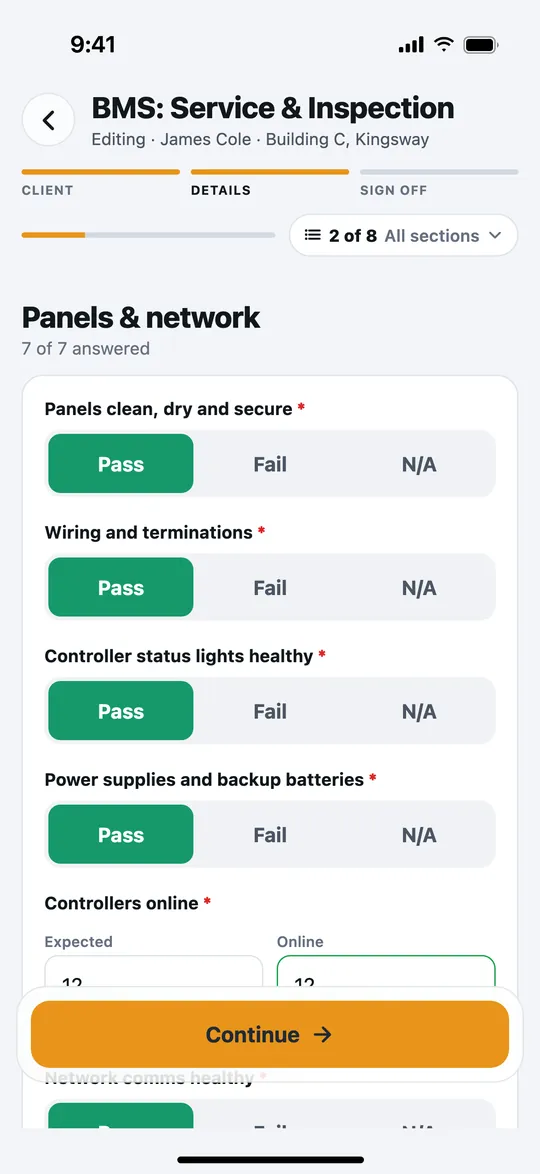
Pick a ready-made form and fill it in
- Pick a form from the listCommissioning and service forms, with the newest one marked New.
- Search by assetType fan coil, VRF or the kit in front of you to find the right form.
- Readings and checksBMS checks answered Pass, Fail or N/A, with the required ones marked.
What works the same in Australia as in the UK?
Everything else. A firm in Australia gets the same Maintivo as a firm in the UK, on the same plans, from £34.99 a month.
- Reports done on siteFill in the form, add photos and both signatures, and get a PDF with your logo before you leave.
- Quotes accepted onlineYour customer views, signs and accepts the quote from the email, and it becomes an invoice.
- Invoices and credit notesFrom a signed report or an accepted quote, with deposit and balance invoices and credit notes.
- The DiaryThe team's shared calendar, on your own time zone.
- Your team, your rulesThe owner sees everything; engineers see their own jobs and never see prices unless you allow it.
- Works with no signal on iPhoneThe iPhone app keeps the whole report, photos and signatures included, and sends it when you are back in signal.
- 1
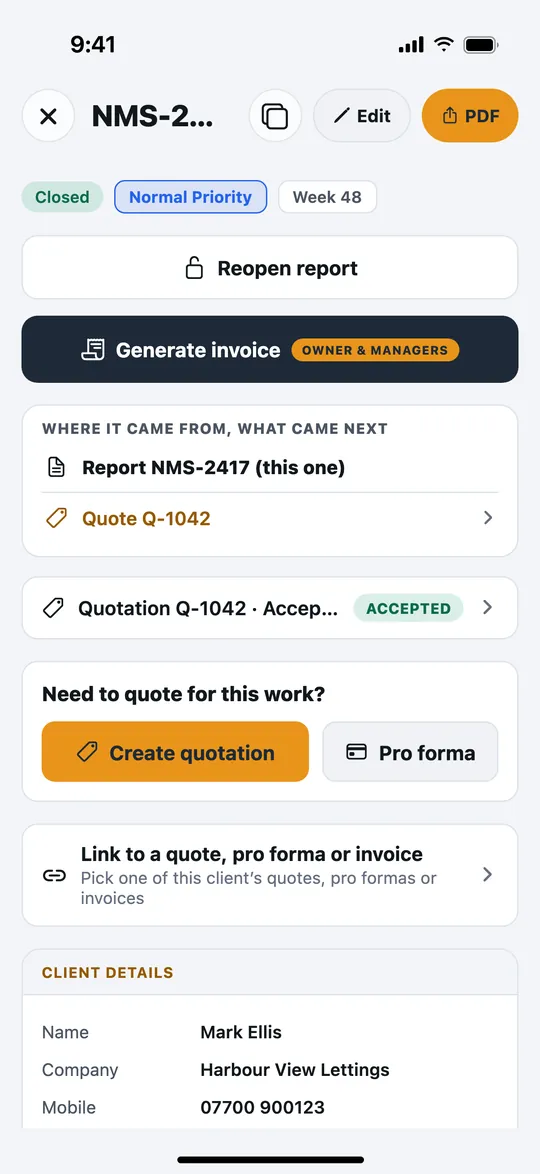
From report to invoice
A closed report with Generate invoice and Create quotation.
- 2
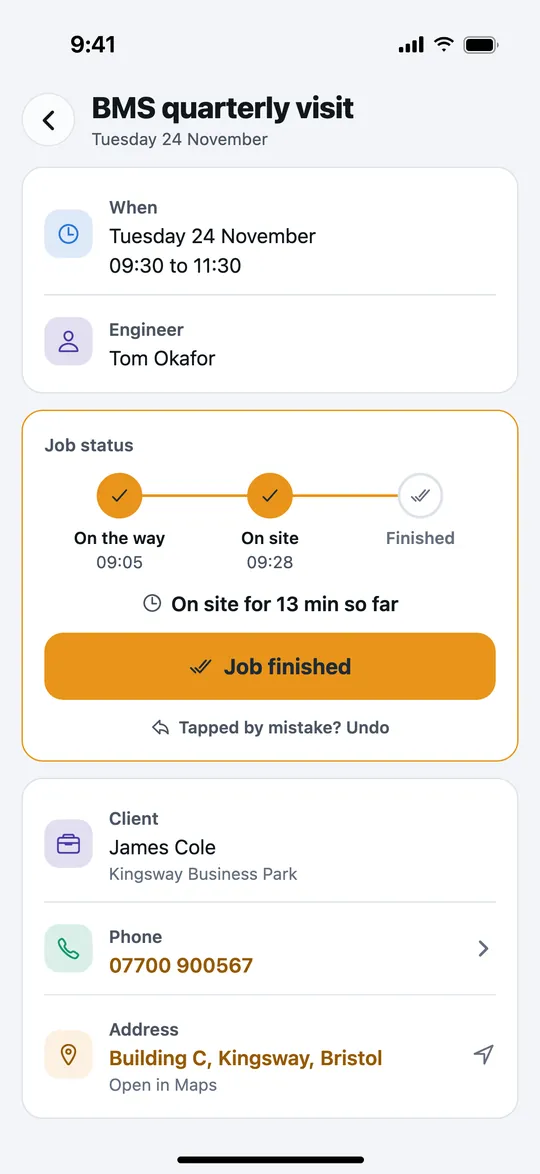
Each job in the Diary
On the way, on site and finished, with the time on site so far.
- 3
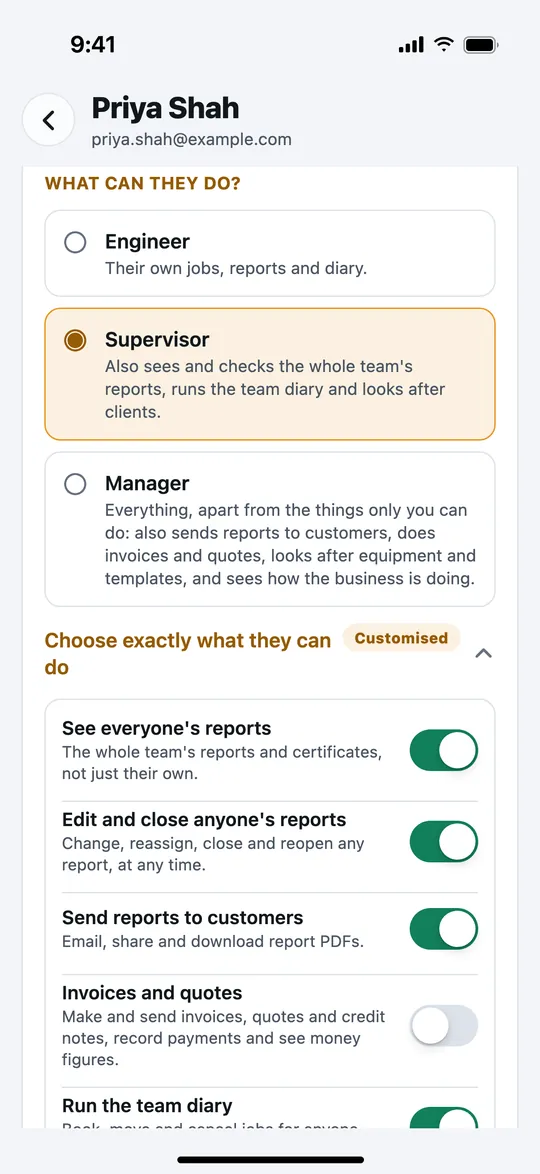
Your team, your rules
Pick a level for each person, then a tick for each permission.
Real screens from the iPhone app. Sample company and names.
Maintivo is in English. See all features and pricing.
Common questions
Yes. Sign up and choose Australia as your country (Maintivo suggests it from your phone or browser). Invoices, quotes and credit notes are then in Australian dollars and say GST, your ABN prints on them, addresses ask for a postcode and state, and the Diary runs on your state's time zone.
Yes, once you switch it on. Turn on Registered for GST in Invoice settings and type your rate: Maintivo adds GST to every new invoice and quote and prints your ABN. It never fills in a rate for you outside the UK.
No. Maintivo shows the tonnes CO2e for each unit, and the engineer sets the next leak-check date, which Maintivo then tracks on the unit. It makes no claim about an Australian legal interval.
Yes. Connect your own Stripe account in Invoice settings: it opens as an Australian Stripe account and the money goes straight to it. Every invoice then has a Pay by card button. Maintivo adds no fee; Stripe charges its usual card fees.
Plans start at £34.99 a month for one person, with 14 days free and no contract. Team (up to 3 people) is £59.99 and Team 10 is £99.99 a month. Invoicing and card payments are included. The checkout shows the exact price before you pay.
Do your next report in Maintivo
Your first report is free to fill in, with no card and no training day. Choose Australia when you sign up and run a real visit through it.
iPhone: No card. No account. First report free to fill in.In your browser: Free account, no card. First report free to fill in.