 Maintivo

Maintivo API and webhooks
Let your own WhatsApp assistant, Zapier, Make, n8n or email automation book jobs straight into the Maintivo diary. It can find the client, check who is free, and book, move or cancel the job. Your engineer and the office are told, just as if you had booked it in the app.
- The business owner makes a connection key in Maintivo, in Settings, Connections, and ticks what it may do.
- Send it as
Authorization: Bearer mtv_live_...tohttps://fhvhkwsmsvcoirmshcfd.supabase.co/functions/v1/api/v1. - Webhooks tell your tool the moment a job is booked, moved or cancelled, signed so you can check they are real.
- Server to server only. Never put a key in a web page or a phone app.
Make a key and test it
- In Maintivo (iPhone or the web app), go to Settings, Connections, and press New key. Only the business owner can do this.
- Give it a name, for example "WhatsApp assistant". Jobs it books show in the diary as "Booked by WhatsApp assistant".
- Tick only what it needs. Copy the key straight into your tool: we show it once and keep only a fingerprint of it.
- Test it with
GET /v1/me, which answers with your company name.
# Test the key
curl "https://fhvhkwsmsvcoirmshcfd.supabase.co/functions/v1/api/v1/me" -H "Authorization: Bearer $MAINTIVO_KEY"

# Find a client by name, phone, email or postcode
curl "https://fhvhkwsmsvcoirmshcfd.supabase.co/functions/v1/api/v1/clients?search=07700%20900123" -H "Authorization: Bearer $MAINTIVO_KEY"

# Who can be booked
curl "https://fhvhkwsmsvcoirmshcfd.supabase.co/functions/v1/api/v1/engineers" -H "Authorization: Bearer $MAINTIVO_KEY"

# When is each engineer busy on 2 December (busy times only)
curl "https://fhvhkwsmsvcoirmshcfd.supabase.co/functions/v1/api/v1/availability?from=2026-12-02T00:00:00Z&to=2026-12-03T00:00:00Z" \
  -H "Authorization: Bearer $MAINTIVO_KEY"
You can have up to 10 keys. Make one per tool, so you can switch one off without touching the others. Switching a key off, or deleting it, stops it at once.
What a key may do
| Scope | In Maintivo it reads | What it allows |
|---|---|---|
clients:read | See clients and sites | Find a client by name, phone, email or postcode, and their sites. |
diary:read | See the diary | Read booked jobs, with their times, address and notes. |
availability:read | See engineers' free and busy times | Only when each engineer is busy. No job details. |
bookings:create | Book jobs | Add a job to the diary, for a client or a new contact. |
bookings:update | Move and cancel its own jobs | Change the time or engineer of a job this key booked, or cancel it. |
bookings:update_all | Move or cancel any job | Also jobs booked in the app or by another key. Only for your own tools. |
A new key starts with only availability:read and bookings:create ticked, which is all a booking assistant needs. It then cannot read your clients or your diary.
Assistants that strangers can message should not have "See clients and sites" (clients:read) or "Move or cancel any job" (bookings:update_all). Anyone chatting to them could ask for your clients' names, numbers and addresses, or cancel other people's jobs.
Endpoints
| Request | Needs | What it does |
|---|---|---|
GET /v1/me | any key | Your company and the key's name and scopes. Use it to test a key. |
GET /v1/clients?search= | clients:read | Find clients by name, company, email, phone or postcode. Up to 100 a page (limit, offset). A search of fewer than 3 letters or digits gives the first 20 only, with no further pages. |
GET /v1/sites?search=&client_id= | clients:read | Find sites. With client_id: the sites that client's jobs were booked at. The same limit of 20 without a search. |
GET /v1/engineers | availability:read, diary:read or a bookings scope | Names and ids of the people you can book. |
GET /v1/availability?from=&to=&engineer_id= | availability:read | When each engineer is busy, up to 31 days. Busy times only, no job details. |
GET /v1/bookings?from=&to=&engineer_id= | diary:read | Booked jobs, up to 92 days. include_cancelled=true adds cancelled ones. |
GET /v1/bookings/{id} | diary:read | One job. |
POST /v1/bookings | bookings:create | Book a job, for a client by id or for new contact details. |
PATCH /v1/bookings/{id} | bookings:update (jobs this key booked) or bookings:update_all | Move a job, or give it to another engineer. |
POST /v1/bookings/{id}/cancel | bookings:update (jobs this key booked) or bookings:update_all | Cancel a job, with an optional reason. |
Times are a date and time with a time zone, for example 2026-12-02T09:00:00Z or 2026-12-02T09:00:00+00:00. A time without a zone is refused, so a job is never booked an hour out.
Book a job
curl -X POST "https://fhvhkwsmsvcoirmshcfd.supabase.co/functions/v1/api/v1/bookings" \
  -H "Authorization: Bearer $MAINTIVO_KEY" \
  -H "Content-Type: application/json" \
  -H "Idempotency-Key: whatsapp-msg-48213" \
  -d '{
    "title": "Boiler service",
    "starts_at": "2026-12-02T09:00:00Z",
    "ends_at": "2026-12-02T10:00:00Z",
    "engineer_id": "<id from /v1/engineers>",
    "client": { "first_name": "Jo", "last_name": "Smith", "mobile": "07700 900123",
                "address": "12 High Street", "city": "Leeds", "postcode": "LS1 1AA" },
    "notes": "Booked on WhatsApp. Side gate code 1234."
  }'
HTTP/1.1 201 Created
Location: /v1/bookings/8d0f...

{
  "booking": {
    "id": "8d0f...", "title": "Boiler service", "status": "booked",
    "starts_at": "2026-12-02T09:00:00.000Z", "ends_at": "2026-12-02T10:00:00.000Z",
    "client_id": "c1a2...", "site_id": null, "address": "12 High Street, Leeds, LS1 1AA",
    "engineer": { "id": "5b7e...", "name": "Sam Jones" },
    "source": "WhatsApp assistant",
    "created_at": "...", "updated_at": "..."
  },
  "client": { "id": "c1a2...", "created": false }
}- Use
client_id(from/v1/clients) orclientwith the contact details. Details whose email or mobile AND name match an existing client are booked for that client; otherwise a new client is added. A new client needs a name and an email or mobile. - The address is the one you send in
address, else the site, else the client. A client found from contact details never gives its saved address, so send the address with the details. A key withoutclients:readis never shown the found client's id. engineer_idis optional. If that engineer already has a job at the time, you get409 engineer_busywith their busy times. Send"allow_overlap": trueto book anyway.- Unknown fields are refused, so a typo never goes unnoticed. Bodies can be up to 16 KB.
Move or cancel
# Move a job (only starts_at: it keeps its length)
curl -X PATCH "https://fhvhkwsmsvcoirmshcfd.supabase.co/functions/v1/api/v1/bookings/<id>" -H "Authorization: Bearer $MAINTIVO_KEY" \
  -H "Content-Type: application/json" -H "Idempotency-Key: move-48214" \
  -d '{ "starts_at": "2026-12-03T14:00:00Z" }'

# Cancel a job, with a reason kept in the job's notes
curl -X POST "https://fhvhkwsmsvcoirmshcfd.supabase.co/functions/v1/api/v1/bookings/<id>/cancel" -H "Authorization: Bearer $MAINTIVO_KEY" \
-H "Content-Type: application/json" -d '{ "reason": "Customer is away" }' - With
bookings:updatea key can only move or cancel the jobs it booked itself. Any other job answers404, or403 not_booked_by_this_keyfor a key that can read the diary. To move or cancel any job, the owner must tickbookings:update_all, "Move or cancel any job". - A move that changes nothing answers
{ "changed": false }, with the job only for a key withdiary:read.
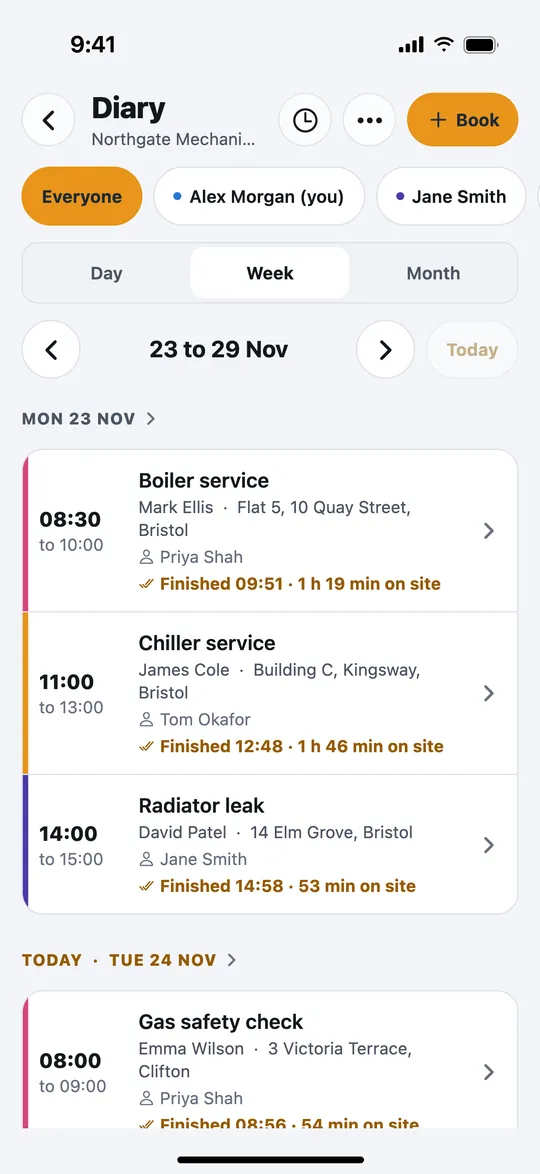
Where a booked job lands
- In the team DiaryWith its time, client, address and engineer, like a job booked by hand.
- Moved or cancelledWebhooks tell your tool when a job is booked, moved or cancelled.
Retries without double bookings
Send an Idempotency-Key header with every POST and PATCH: up to 200 letters, digits and _ - : ., for example the id of the WhatsApp message. If the same request comes again with the same key within 24 hours, you get the first answer back, with Idempotent-Replayed: true, and nothing is booked twice. The same key with a different request gets 422.
Rate limits
- 120 requests a minute per key.
- 600 bookings made, moved or cancelled an hour per key, of those at most 60 cancelled.
- 300 requests a minute per IP address, and a small allowance for wrong keys.
Over a limit you get 429 with a Retry-After header in seconds.
Errors
Every error is JSON, with a short code you can act on and a request id:
{ "error": { "code": "insufficient_scope", "message": "This key may not do that. ..." }, "request_id": "4c7b..." }| Status | Code | Meaning |
|---|---|---|
400 | invalid_request | Something in the request is missing or not valid. The message says what. |
401 | unauthorized | No key, or not a valid key. |
401 | key_disabled | The owner switched this key off. |
403 | insufficient_scope | The key was not given this permission. |
403 | not_booked_by_this_key | The key may only move or cancel jobs it booked itself. |
404 | not_found | No such path, or no such client, site, engineer or job in your business. |
409 | engineer_busy | The engineer has a job then. The busy times are in the answer. |
409 | booking_cancelled / booking_done | That job can no longer be moved or cancelled. |
409 | idempotency_in_progress | The first request with this Idempotency-Key is still running. |
413 | payload_too_large | The body is over 16 KB. |
415 | unsupported_media_type | Send JSON with Content-Type: application/json. |
422 | idempotency_mismatch | This Idempotency-Key was used for a different request. |
429 | rate_limited | Too many requests. Wait for the Retry-After seconds. |
500 / 503 | server_error / unavailable | Our side. Try again; quote the request_id if it keeps happening. |
Webhooks
The owner adds an https address in Settings, Connections, and Maintivo posts to it the moment a job is booked, moved or cancelled, however it happened: in the iPhone app, on the web, or through a key. They get a signing secret, shown once.
booking.created: a job is booked (or booked again after a cancel).booking.moved: its time or engineer changed.previoushas the old ones.booking.cancelled: it was cancelled, or deleted ("deleted": true).webhook.test: sent when the owner presses Send a test.
POST https://your-tool.example.com/maintivo
Content-Type: application/json
Maintivo-Event: booking.moved
Maintivo-Delivery: 6f1c0c1e-...
Maintivo-Signature: t=1764601445,v1=5f2b8c...

{
  "id": "6f1c0c1e-...",
  "type": "booking.moved",
  "created_at": "2026-12-01T15:04:05.000Z",
  "company_id": "...",
  "data": {
    "booking": {
      "id": "8d0f...", "title": "Boiler service", "status": "booked",
      "starts_at": "2026-12-03T14:00:00Z", "ends_at": "2026-12-03T15:00:00Z",
      "client_id": "c1a2...", "site_id": null, "address": "12 High Street, Leeds, LS1 1AA",
      "engineer": { "id": "5b7e...", "name": "Sam Jones" },
      "source": "WhatsApp assistant", "deleted": false, "updated_at": "..."
    },
    "previous": { "starts_at": "2026-12-02T09:00:00Z", "ends_at": "2026-12-02T10:00:00Z", "engineer_id": "5b7e..." }
  }
}- Answer with any 2xx within 10 seconds. Anything else is tried again after 1 minute, 5 minutes, 30 minutes, then 2, 6, 12 and 24 hours.
idis the same on every try, so ignore one you have already handled.- Redirects are not followed. The address must be public https: private networks and IP addresses are refused.
- After 20 failed tries in a row the webhook is switched off and the owner is emailed. They can switch it back on in Settings, Connections.
Check the signature
Maintivo-Signature is t=<unix time>,v1=<hex>, where the hex is an HMAC-SHA256 of <t>.<raw body> with your signing secret. Compare in constant time and refuse anything older than five minutes. The same scheme as Stripe's, so many tools already know it.
When the owner makes a new signing secret, the old one keeps working for 24 hours: each message then carries two v1 values, one made with the new secret and one with the old. Accept the message if any v1 matches, and switch to the new secret within the day.
// Node 18 or later. Check the RAW body, before any JSON parsing.
import crypto from "node:crypto";
import express from "express";

function isFromMaintivo(rawBody, signatureHeader, secret) {
  // Maintivo-Signature: t=1764601445,v1=5f2b8c...
  const parts = Object.fromEntries(
    String(signatureHeader || "").split(",").map((p) => p.trim().split("=", 2))
  );
  const t = Number(parts.t);
  // Older than five minutes: refuse it (someone may be replaying it).
  if (!t || Math.abs(Date.now() / 1000 - t) > 300) return false;
  const expected = crypto.createHmac("sha256", secret).update(`${t}.${rawBody}`).digest("hex");
  // Right after a new secret is made there are two v1 values (new and old): accept either.
  const given = String(signatureHeader || "").split(",").map((p) => p.trim())
    .filter((p) => p.startsWith("v1=")).map((p) => p.slice(3));
  return given.some((v) => v.length === expected.length &&
    crypto.timingSafeEqual(Buffer.from(v), Buffer.from(expected)));
}

const app = express();
const seen = new Set(); // use your database in real life

app.post("/maintivo", express.raw({ type: "application/json" }), (req, res) => {
  const raw = req.body.toString("utf8");
  if (!isFromMaintivo(raw, req.get("Maintivo-Signature"), process.env.MAINTIVO_WEBHOOK_SECRET)) {
    return res.status(400).send("bad signature");
  }
  const event = JSON.parse(raw);
  if (seen.has(event.id)) return res.sendStatus(200); // a retry we already handled
  seen.add(event.id);
  // event.type: booking.created | booking.moved | booking.cancelled | webhook.test
  res.sendStatus(200); // answer quickly, do slow work afterwards
});

app.listen(3000);
With Zapier, Make, n8n or a WhatsApp assistant
There is no Maintivo app inside Zapier, Make or n8n yet. Their own HTTP and webhook steps work with Maintivo today.
Book from your tool
- Add an HTTP request step (in Zapier, Webhooks by Zapier with a custom request; in Make, the HTTP module; in n8n, the HTTP Request node).
- Method
POST, addresshttps://fhvhkwsmsvcoirmshcfd.supabase.co/functions/v1/api/v1/bookings. - Headers
Authorization: Bearer <your key>,Content-Type: application/json, and anIdempotency-Keymade from the thing that started the flow (a form entry id, an email id). - The JSON body as in "Book a job" above. Keep the key in the tool's saved credentials, not typed into the step where others can see it.
Hear about changes
- Start a flow with the tool's webhook trigger ("Catch hook" or "Webhook") and copy the address it gives you.
- Paste it into Maintivo, Settings, Connections, Webhook, and press Send a test. The test arrives as
webhook.test. - Where the tool can run a code step, check the signature with the sample above.
A WhatsApp or other AI assistant
- Make a key with only
availability:readandbookings:create(addbookings:updateif it may move or cancel the jobs it booked). Anyone can message an assistant like this, so never give its keyclients:readorbookings:update_all. - Give the assistant two actions: find a free time (
GET /v1/availability), and book (POST /v1/bookingswith the customer's name, mobile or email and address, and the message id as the Idempotency-Key). A returning customer is matched to their record by their details and name. - Have it read the date, time and address back to the customer before it books.
- Use the webhook to tell the customer when the office moves or cancels the job.
Keeping it safe
- Keys are long random strings starting
mtv_live_. Maintivo keeps only a fingerprint (a SHA-256 hash), so even we cannot show a key again. - Each key reaches one business only, and only what was ticked.
- The API is for servers and automation tools. Browsers are blocked from calling it, so a key can't be used from a web page.
- If a key may have leaked, switch it off or delete it in Settings, Connections. It stops working at once.
Questions: support@maintivo.com. See also the Maintivo diary.
Your keys are in Settings, Connections
Open Maintivo on your iPhone, Android phone or computer, then make a key for your assistant or automation.