
Maintivo on Android
Maintivo works on every Android phone and tablet. Open app.maintivo.com in Chrome and tap Install: it then opens from your home screen like any other app.
iPhone: No card. No account. First report free to fill in.In your browser: Free account, no card. First report free to fill in.
 MaintivoSign up free
 Maintivoapp.maintivo.com
09:41
Maintivo- On Android, Maintivo is the web app at app.maintivo.com, installed to your home screen.
- It takes a minute, in Chrome or Samsung Internet.
- It gets its own icon and opens full screen, like any other app.
- The same account as the iPhone app and your computer: sign in with the same email.
- No extra cost: one plan covers every phone and computer.
How do I install Maintivo on Android?
Three taps in Chrome, the browser most Android phones come with.
- 09:41app.maintivo.com⋮MaintivoSign up free
Open app.maintivo.com in Chrome
Type app.maintivo.com in the address bar at the top, or tap the button on this page. Sign up, or sign in if you already have an account.
- 09:41app.maintivo.com⋮MaintivoSign up free
Tap Install app
Chrome often offers Install app at the bottom of the screen. If it does not, tap the menu ⋮ at the top right, then Install app or Add to Home screen.
- 09:41app.maintivo.com⋮MaintivoSign up freeInstall app?Maintivoapp.maintivo.comCancelInstall
Confirm
Tap Install. The Maintivo icon is added to your home screen. From now on, open Maintivo from there, like any other app.
How do I add Maintivo to the home screen on a Samsung phone?
If you use Samsung Internet instead of Chrome, the menu is at the bottom of the screen.
- 09:41app.maintivo.comMaintivoSign up free
Open app.maintivo.com in Samsung Internet
Type app.maintivo.com in the address bar, then sign up or sign in.
- 09:41app.maintivo.comMaintivoSign up free
Tap the menu, then Add page to
Tap the menu ☰ at the bottom right, then Add page to.
- 09:41app.maintivo.comMaintivoSign up free
Tap Home screen, then Add
Choose Home screen, then tap Add. The Maintivo icon appears on your home screen.
What do I get once it is installed?
09:41
Maintivo- Its own iconMaintivo sits on your home screen and in your app list, next to your other apps.
- Opens full screenNo address bar and no browser tabs: just Maintivo.
- NotificationsFor the Diary and for payments, where your phone allows them.
- The same account everywhereThe same reports, customers, quotes and invoices as on iPhone and on your computer. Sign in with the same email.
What is different from the iPhone app?
Two things. Everything else, the forms, reports, quotes, invoices and the Diary, is the same.
It needs a signal to save
A report started without a signal is kept as a draft on the phone until it can be saved. The iPhone app works with no signal at all and sends everything later.
No home-screen widget
The iPhone app has a widget for your home screen. On Android you open Maintivo from its icon instead.
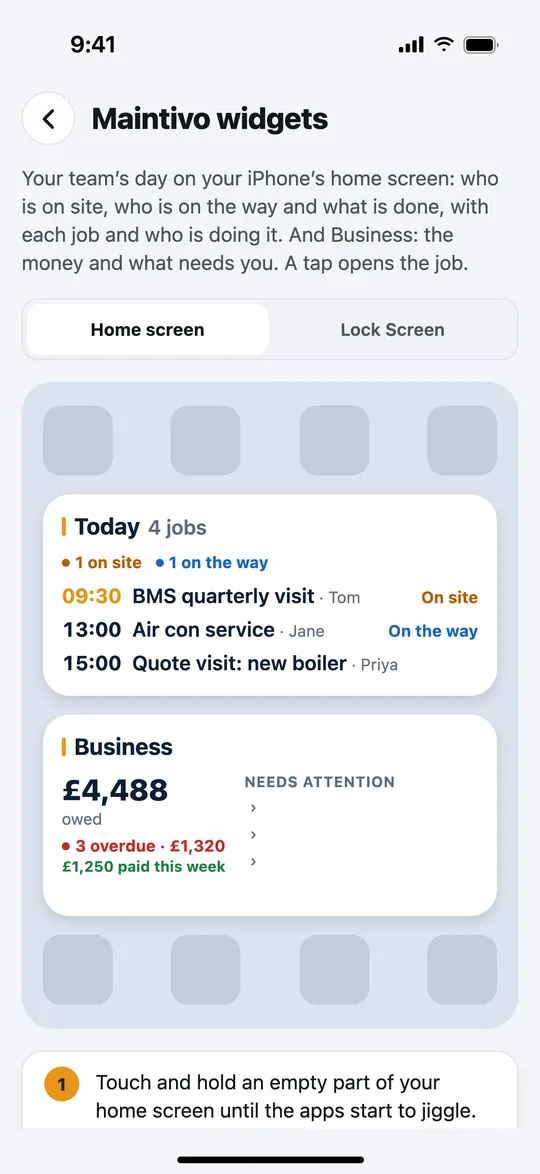
The home-screen widget
- TodayWho is on site and who is on the way.
- BusinessMoney owed and overdue invoices.
- On AndroidOpen Maintivo from its icon instead.
Also on an iPhone? Get the iPhone app. On a computer, use the same address: app.maintivo.com. More answers in the FAQ.
Common questions
No, and you do not need one. On Android, Maintivo is the web app at app.maintivo.com. Install it from Chrome or Samsung Internet and it sits on your home screen with its own icon and opens full screen, like any other app.
No. It is one account and one plan on iPhone, Android and computer, from £34.99 a month, with 14 days free and no contract.
Yes. Everyone signs in to the same company account, whatever phone they carry. A job booked on a computer shows on an engineer's iPhone or Android phone, and a report written on Android is there for the office straight away.
Do your next report in Maintivo
Your first report is free to fill in, with no card and no training day. Run a real visit through it and see.


iPhone: No card. No account. First report free to fill in.In your browser: Free account, no card. First report free to fill in.